
Multiplying Integers on a Number Line: Visualizing the Sign Rule
Loading the math board and drawing, please wait…
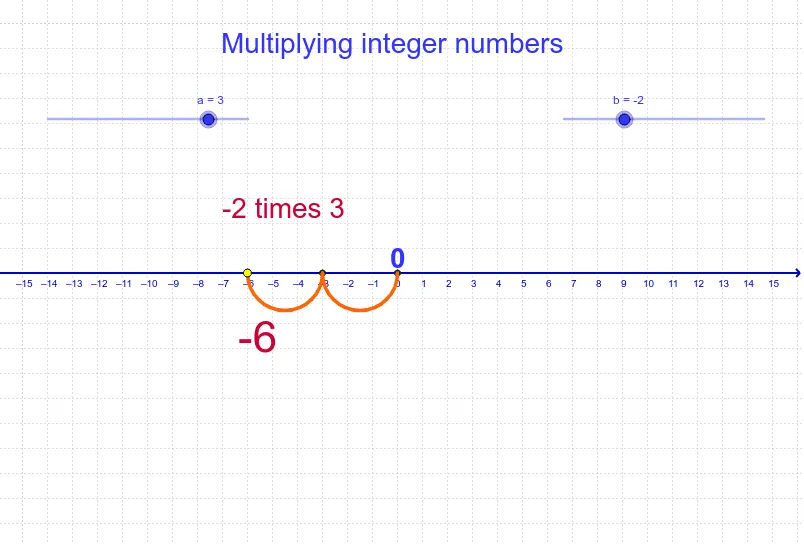
This GeoGebra applet dynamically demonstrates integer multiplication on a number line, helping students intuitively grasp the sign rule for multiplying positive and negative numbers. The core mathematical concept is integer multiplication, represented through direction and distance on the number line, along with the rule that like signs yield positive products and unlike signs yield negative products. The construction uses GeoGebra commands such as Arc, If, and Sequence to create dynamic points and segments on the number line, with objects including A, a, b, c, lista3, lista1, B, d, and text labels texto1 through texto4 that display the multiplicands, product, and sign explanations. This resource is ideal for middle school mathematics classrooms or self-study, helping students overcome the abstract challenge of sign rules, and also serves as a reference for teachers creating interactive lessons.
GeoGebra Commands & Parameters
Arc((x - a / 2)^(2) = a / 2, (0, 0), (a, 0)) → cIf(b < 0, Sequence[(-a * n, 0), n, 0, -b], Sequence[(a * n, 0), n, 0, b]) → lista3Sequence(Semicircle[Element[lista3, n], Element[lista3, n + 1]], n, 1, abs(b)) → lista1
AI Drawing Prompt Reference
Visualize integer multiplication on a number line, showing direction and distance to illustrate the sign rule for positive and negative numbers. Draw a semicircle first, then generate multiple semicircles connected to form a wavy curve based on the multiplier, intuitively demonstrating the multiplication process and result, with labels for the factors and product, and explanations for the sign rules.
The prompt above was compiled from the original drawing commands and is for reference only.