
Miscellaneous Exercise Question 3: Visualizing 3D Rotations and Differential Equ
Loading the math board and drawing, please wait…
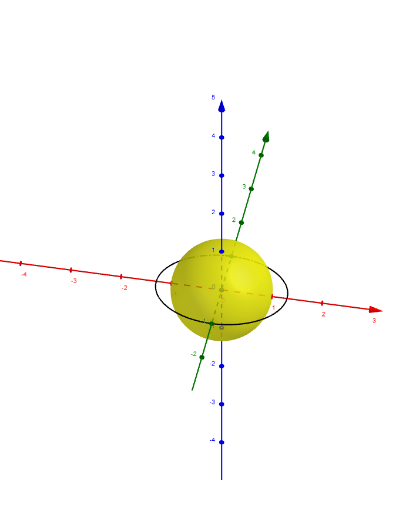
① This GeoGebra example constructs a dynamic 3D scene involving spheres, circles, curves, points, lines, sequences, and rotations to illustrate a comprehensive mathematics exercise. ② It integrates core concepts such as volume, differential equations, trigonometric functions, variance, and tree diagrams, bridging solid geometry, calculus, and probability. ③ The construction uses commands like Sphere, Circle, CurveCartesian, Point, Line, Sequence, and Rotate, along with RotateAboutXaxis and RotateAboutYaxis for 3D transformations, while ShowHide, text objects (text1–text4), and lists (liste1–liste4) enable interactive display and control. ④ Suitable for high school to early college students as a review exercise, it helps explore connections between geometric transformations and mathematical analysis, and can be used for classroom demonstrations or self-study.
GeoGebra Commands & Parameters
Sphere((0, 0, 0), 1) → aCircle((0, 0, 0), 1, z = 0) → cCurveCartesian(((-sqrt(1 - u^(2))) * sf), u, 0, u, -1, 1) → bCurveCartesian((sqrt(1 - u^(2)) * sf), u, 0, u, -1, 1) → dCircle((0, 0, 0), 1, x + (0 * z) = 0) → ePoint(c) → CPoint(c) → DPoint(zAxis) → ELine(E, D) → fLine(E, C) → gCircle(E, 1, y + (0 * z) = 0) → hSequence(Rotate[b, ((n * 180) * ° / td), f], n, 1, td - 1) → liste2Sequence(Rotate[d, ((n * 180) * ° / td), g], n, 1, td - 1) → liste3Sequence(Rotate[d, ((n * 180) * ° / td), f], n, 1, td - 1) → liste4Sequence(Rotate[b, ((n * 180) * ° / td), g], n, 1, td - 1) → liste1Sphere(E, sf) → iRotate(b, ((2 * π) * RotateAboutXaxis), f) → b'Rotate(d, ((2 * π) * RotateAboutXaxis), f) → d'Rotate(b, ((2 * π) * RotateAboutYaxis), g) → b'_1Rotate(d, ((2 * π) * RotateAboutYaxis), g) → d'_1
AI Drawing Prompt Reference
Draw a sphere and a circle centered at the origin with radius 1, then draw two semicircular arcs on the xoz plane, one in the positive x direction and one in the negative z direction. Rotate these arcs around the x-axis and y-axis to generate a series of rotated arcs. Finally, rotate the entire sphere around the x-axis and y-axis to generate rotated spheres.
The prompt above was compiled from the original drawing commands and is for reference only.