
Menorah: Symmetric 3D Construction with Vectors and Linear Equations
Loading the math board and drawing, please wait…
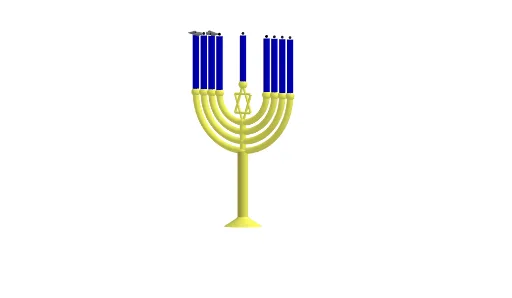
① This GeoGebra example constructs a three-dimensional 'Menorah' (candelabrum) shape, demonstrating how to combine lines, segments, curves, arcs, polygons, and surfaces to create a symmetric solid. ② Core mathematical concepts include 3D vectors, linear equations (defining lines and planes), polygon construction, and parametric surfaces, along with intersections, segments, and circular arcs. ③ Construction highlights: from the summary, commands such as Line, Segment, CurveCartesian, CircumcircleArc, Polygon, and Surface are used, with many point objects (A, B, C, D, etc.) defined via linear equations and vector relations to position elements, resulting in a complete 3D model. ④ Suitable for high school to university-level mathematics, especially in solid geometry, vector and linear algebra courses, as well as for art-mathematics or introductory computer graphics, helping students understand geometric construction and mathematical representation in 3D modeling.
GeoGebra Commands & Parameters
Line(A, B) → fSegment(C, D) → gSegment(E, C) → hLine(F, G) → iCurveCartesian((0.25 * sin(t)), (0.25 * cos(t)), 2, t, 0, (2 * π)) → bCircumcircleArc(I, O, J) → cCircumcircleArc(K, M, L) → dCircumcircleArc(N, Q, P) → eSegment((0, 0, 3.5), (0, 0, 2)) → jCircumcircleArc(S, R, T) → kSegment(P, (-3, 0, 8)) → lSegment(S, (1.5, 0, 8)) → mSegment(T, (-1.5, 0, 8)) → nSegment(L, (-2.5, 0, 8)) → pSegment(J, (-2, 0, 8)) → qSegment(I, (2, 0, 8)) → rSegment(K, (2.5, 0, 8)) → sSegment(N, (3, 0, 8)) → tPolygon(H_1, G_1, F_1) → t1, f_1, h_1, g_1Polygon(J_1, I_1, E_1) → t2, e_1, j_1, i_1Segment((0, 0, 5.5), (0, 0, 8.1)) → k_1Polygon(M_1, L_1, N_1) → t3, n_1, m_1, l_1Polygon(Q_1, P_1, O_1) → t4, o_1, q_1, p_1Polygon(T_1, S_1, R_1) → t5, r_1, t_1, s_1Polygon(U_1, W_1, V_1) → t6, v_1, u_1, w_1Polygon(B_2, A_2, Z_1) → t7, z_1, b_2, a_2Polygon(D_2, C_2, E_2) → t8, e_2, d_2, c_2Polygon(H_2, G_2, F_2) → t9, f_2, h_2, g_2Polygon(K_2, J_2, I_2) → t10, i_2, k_2, j_2Polygon(N_2, M_2, L_2) → t11, l_2, n_2, m_2Surface(g, (2 * π), f) → aSurface(h, (2 * π), f) → u
AI Drawing Prompt Reference
Create a symmetric 3D candelabrum (menorah) model. Start with a central vertical axis, then place several horizontal cross-sections at different heights, each consisting of three points forming a triangle, arranged with rotational symmetry. Connect corresponding points between layers using lines and segments to form branches and the base. Add circular arcs and curves at the top to represent decorative elements or flames. Ensure the entire structure is symmetric about the central axis, using polygons and surfaces to give a solid appearance.
The prompt above was compiled from the original drawing commands and is for reference only.