
Measuring Angles with Geodreieck
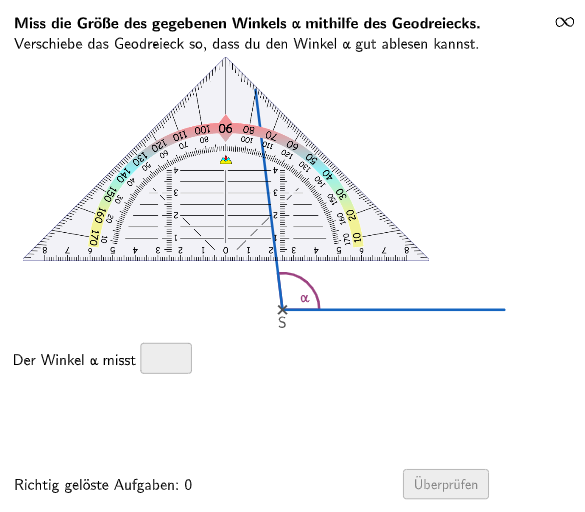
Loading the math board and drawing, please wait…
In collections
Wiederholung Winkel: Bezeichnung, Arten, Messen & Zeichnen
This example demonstrates how to use a geodreieck to measure angles. The core mathematical concepts involved include angle measurement and properties of triangles. The construction points include using GeoGebra commands such as Shuffle, Element, Rotate, Angle, Text, Textfield, Polygon, Append, Remove, Defined, Sequence, Point, Vector, Midpoint, Join, etc. This example is suitable for middle school mathematics education, particularly for measuring angles and properties of triangles.
GeoGebra Commands & Parameters
Shuffle(Sequence[Random[30, 175], i, 1, 100]) → randomNosForX, {97, 175, 67, 116, 51, 108, 104, 163, 151, 99, 104, 74, 116, 156, 93, 150, 62, 51, 113, 55, 133, 106, 67, 104, 103, 85, 134, 79, 48, 35, 138, 66, 105, 108, 91, 96, 73, 161, 39, 145, 40, 110, 93, 124, 65, 64, 47, 69, 107, 55, 109, 117, 169, 62, 74, 43, 59, 106, 54, 141, 142, 118, 57, 132, 166, 164, 46, 151, 59, 77, 48, 32, 174, 34, 174, 137, 124, 115, 166, 156, 88, 124, 121, 117, 111, 52, 65, 48, 146, 91, 106, 91, 46, 36, 127, 84, 54, 74, 44, 149}Element(randomNosForX, Mod[questionCount, 100] + 1) → numXRotate((circlewidth, 0), numXwinkel) → P2Angle(P2) → βText(input1) → textinput1Textfield(input1) → InputBox1Textfield(input2) → InputBox2Polygon(PtopLeftCornerFeedback, PtopRightCornerFeedback, PbottomRightCornerFeedback, PbottomLeftCornerFeedback) → rectangleCorrect, rectangleCorrectS3, rectangleCorrectS4, rectangleCorrectS2, rectangleCorrectS1Shuffle(Sequence[Random[0, 10], i, 1, 100]) → randomNosForY, {4, 5, 2, 4, 0, 5, 6, 8, 7, 10, 1, 6, 6, 9, 6, 4, 7, 7, 9, 9, 3, 1, 5, 5, 1, 0, 4, 5, 4, 4, 0, 4, 10, 7, 3, 9, 4, 7, 5, 1, 6, 8, 8, 8, 1, 7, 1, 9, 5, 2, 8, 3, 4, 2, 5, 9, 9, 3, 7, 3, 8, 0, 9, 0, 8, 4, 6, 0, 5, 4, 3, 9, 7, 8, 10, 4, 0, 2, 5, 0, 4, 0, 10, 2, 2, 6, 9, 7, 3, 9, 0, 1, 10, 2, 0, 0, 0, 8, 10, 4}Element(randomNosForY, Mod[questionCount, 100] + 1) → numYAppend(true, Sequence[If[randomNosForX(i) ≟ randomNosForX(i - 1), false, true], i, 2, 100]) → stayXAppend(true, Sequence[If[randomNosForY(i) ≟ randomNosForY(i - 1), false, true], i, 2, 100]) → stayYRemove(Sequence[If[stayX(i), randomNosForX(i), 0], i, 1, 100], Sequence[0, i, 1, 100]) → randomNosForXwithoutRepeatRemove(Sequence[If[stayY(i), randomNosForY(i), 0], i, 1, 100], Sequence[0, i, 1, 100]) → randomNosForYwithoutRepeatElement(randomNosForXwithoutRepeat, Mod[questionCount, Length[randomNosForXwithoutRepeat]] + 1) → numXwithoutRepeatElement(randomNosForYwithoutRepeat, Mod[questionCount, Length[randomNosForYwithoutRepeat]] + 1) → numYwithoutRepeatDefined(input1) → fixedSequence(Rotate[(circlewidth, 0), m°], m, 0, 360) → listCirclePointsPoint(listCirclePoints) → PAngle(Vector[(circlewidth, 0)], Vector[P]) → αVector((0, 0), P) → uRotate((1, 0), (0.5 * β)) → MPoint(Translate[Segment[EE + (((-geodreieckwidth) * 0.5), 0), S + (((-geodreieckwidth) * 0.5), 0)], (geodreieckwidth, 0)]) → DPoint(Segment[EE + (((-geodreieckwidth) * 0.5), 0), S + (((-geodreieckwidth) * 0.5), 0)]) → CMidpoint(C, D) → EJoin(Sequence[Shuffle[Sequence[1, 5]], m, 1, 25]) → randomNosForWinkelNames
AI Drawing Prompt Reference
Create a dynamic angle measurement illustration showing an angle formed by two lines and a triangle within it. Start by drawing a circle and marking a random point on it. Then, rotate a point from the center to this point by a random angle to create another point. Measure the angle between the line connecting these two points and the radius to the first point. Next, mark points on the angle's sides and connect them to form a quadrilateral. Finally, draw a triangle inside the quadrilateral to demonstrate the application of angle measurement and triangle properties.
The prompt above was compiled from the original drawing commands and is for reference only.