
Max Bill Geometric Construction by Mihaela Git
Loading the math board and drawing, please wait…
In collections
Paintings modeled in Geogebra
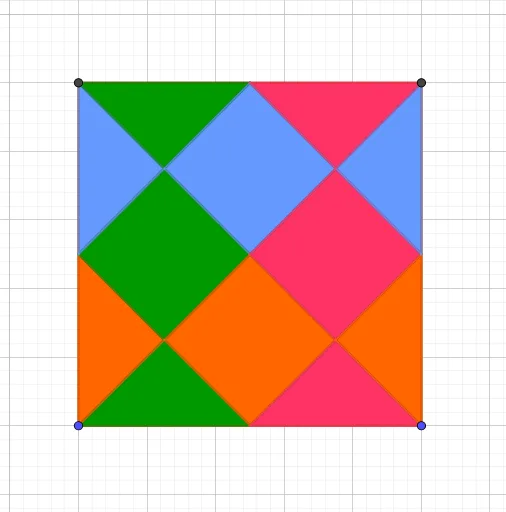
This example demonstrates how to construct Max Bill's geometric shapes using GeoGebra, involving polygons, triangles, and centroid points. Key math concepts include polygon construction, midpoints, line segments, intersection points, center of gravity, function graphs, and exponential functions. Construction highlights: utilizes commands like Polygon, Intersect, Midpoint, and Segment. Suitable for high school mathematics teaching, showcasing geometric construction techniques and the integration of functions with geometry.
GeoGebra Commands & Parameters
Polygon(A, B, 4) → poly1, f, g, h, i, C, DIntersect(h, i) → EIntersect(g, h) → FIntersect(f, i) → GIntersect(f, g) → HMidpoint(h) → IMidpoint(i) → JMidpoint(g) → KMidpoint(f) → LSegment(D, B) → jMidpoint(j) → MSegment(C, A) → kSegment(J, L) → lSegment(L, K) → mSegment(K, I) → nSegment(I, J) → pIntersect(j, p) → NIntersect(k, n) → OIntersect(k, l) → PIntersect(j, m) → QIntersect(f, l) → RIntersect(j, k) → SIntersect(h, n) → TIntersect(g, m) → UIntersect(i, l) → VPolygon(A, P, L) → t1, l_1, a, p_1Polygon(J, A, P) → t2, p_2, j_1, a_1Polygon(J, N, M, P) → q1, j_2, n_1, m_1, p_3Polygon(J, D, N) → t3, n_2, j_3, dPolygon(D, I, N) → t4, n_3, d_1, i_1Polygon(N, I, O, M) → q2, n_4, i_2, o, m_2Polygon(M, P, L, Q) → q3, m_3, p_4, l_2, qPolygon(M, O, K, Q) → q4, m_4, o_1, k_1, q_1Polygon(L, B, Q) → t5, q_2, l_3, bPolygon(Q, K, B) → t6, b_1, q_3, k_2Polygon(O, C, K) → t7, k_3, o_2, cPolygon(O, I, C) → t8, c_1, o_3, i_3
AI Drawing Prompt Reference
Draw a complex geometric shape composed of multiple polygons, including several triangles and centroid points. Start by creating a hexagon, then find the midpoints of its sides and connect these midpoints to form a new polygon. Next, draw several triangles inside the hexagon, with their vertices at the vertices of the hexagon and the centroid. Finally, connect these triangles and centroid points to form a complex geometric pattern.
The prompt above was compiled from the original drawing commands and is for reference only.