
Mapping Special Right Triangles on the Unit Circle
Loading the math board and drawing, please wait…
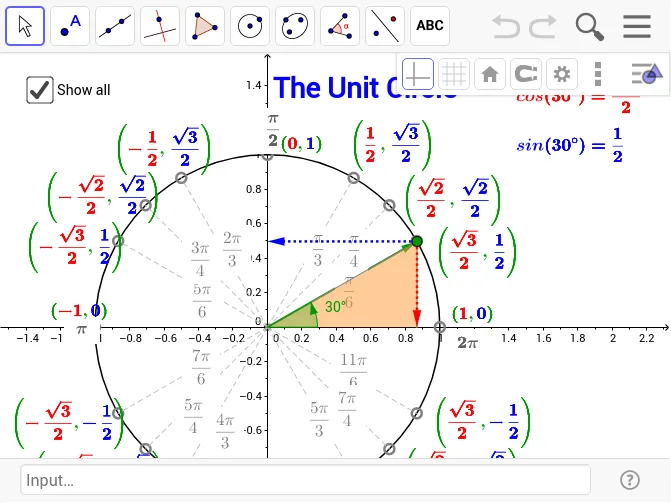
This example demonstrates the mapping of special right triangles on the unit circle to investigate the relationship between their x and y coordinates and sine and cosine. It uses commands such as Intersect, Circle, Segment, Distance, Angle, Vector, and Polygon. Suitable for students learning trigonometry and coordinate geometry.
GeoGebra Commands & Parameters
Intersect(xAxis, yAxis) → OPoint(xAxis) → ECircle(O, E) → c_1Point(c_1) → XSegment(O, X) → aDistance(X, A_1) → bAngle(E, O, X) → αSegment(A_1, (x(A_1), 0)) → fSegment(A_2, (x(A_2), 0)) → gSegment(B_2, B_1) → hSegment(C_2, C_1) → iVector(O, X) → uVector(X, (x(X), 0)) → vVector(X, (0, y(X))) → wPoint(u) → ASegment(A, C_2) → eSegment(A, B_2) → jSegment(A, A_2) → kSegment(A, A_3) → lSegment(A, B_3) → mSegment(A, C_3) → nSegment(A, C_4) → pSegment(A, B_4) → qSegment(A, A_4) → rSegment(A, A_1) → s_1Segment(A, B_1) → tSegment(A, C_1) → a_1Polygon(X, (x(X), 0), A) → poly1, a_2, B, b_1Polygon((abs(x(X)), abs(y(X))), A, (abs(x(X)), 0)) → poly2, d_1, e_1, a_3
AI Drawing Prompt Reference
Draw a special right triangle on the unit circle. Start by drawing the intersection point O of the x-axis and y-axis, then draw a circle c_1 with O as the center and OE as the diameter. Next, take a point X on the circle and draw line segment a from O to X, measure the distance b from X to A1, and calculate the angle α between EO and X. Then draw horizontal line f and vertical line g from X to A1, and line segments h, i from X to A2, B2, C2. Draw vector OX, horizontal line v, and vertical line w from X to A1, then draw point A, and connect A to C2, B2, A2, A3, B3, C3, A4, B4, C4, A1, B1, and C1. Finally, draw two polygons: one with vertices X, A1, A, and another with vertices A1, A, A1.
The prompt above was compiled from the original drawing commands and is for reference only.