
Make it close to 5000
Loading the math board and drawing, please wait…
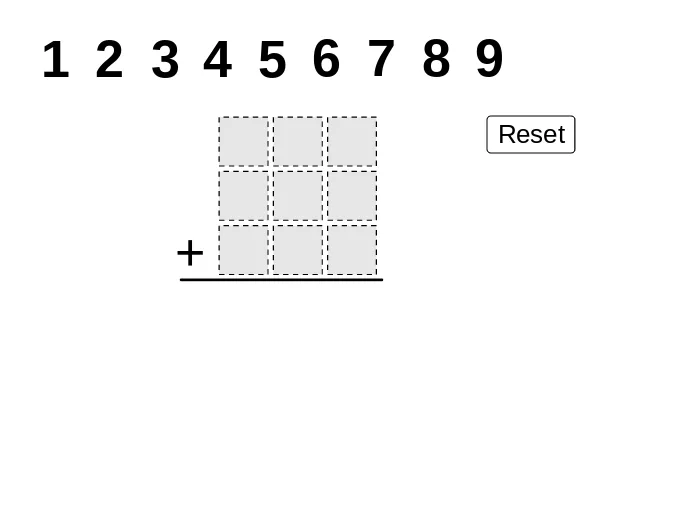
This example demonstrates how to manipulate mathematical operations to get a result close to 5000. It involves core concepts like addition, algebraic equations, Poisson distribution, rhombus, translation, random experiments, and more. GeoGebra commands and objects used include Polygon, Segment, If, Mod, Div, and Sequence for construction. Suitable for high school and above, focusing on optimization and probability & statistics applications.
GeoGebra Commands & Parameters
Polygon((0, 0), (0.9, 0), 4) → poly1Polygon((2, 0), (2.9, 0), 4) → poly3Polygon((1, 0), (1.9, 0), 4) → poly2Polygon((0, 1), (0.9, 1), 4) → poly4Polygon((1, 1), (1.9, 1), 4) → poly5Polygon((2, 1), (2.9, 1), 4) → poly6Polygon((0, 2), (0.9, 2), 4) → poly7Polygon((1, 2), (1.9, 2), 4) → poly8Polygon((2, 2), (2.9, 2), 4) → poly9Segment(J, K) → aIf(IsInRegion[A, poly9], 1, If[IsInRegion[B, poly9], 2, If[IsInRegion[C, poly9], 3, If[IsInRegion[D, poly9], 4, If[IsInRegion[E, poly9], 5, If[IsInRegion[F, poly9], 6, If[IsInRegion[G, poly9], 7, If[IsInRegion[H, poly9], 8, If[IsInRegion[I, poly9], 9, 0]]]]]]]]) → nineSumIf(IsInRegion[A, poly8], 1, If[IsInRegion[B, poly8], 2, If[IsInRegion[C, poly8], 3, If[IsInRegion[D, poly8], 4, If[IsInRegion[E, poly8], 5, If[IsInRegion[F, poly8], 6, If[IsInRegion[G, poly8], 7, If[IsInRegion[H, poly8], 8, If[IsInRegion[I, poly8], 9, 0]]]]]]]]) → eightSumIf(IsInRegion[A, poly7], 1, If[IsInRegion[B, poly7], 2, If[IsInRegion[C, poly7], 3, If[IsInRegion[D, poly7], 4, If[IsInRegion[E, poly7], 5, If[IsInRegion[F, poly7], 6, If[IsInRegion[G, poly7], 7, If[IsInRegion[H, poly7], 8, If[IsInRegion[I, poly7], 9, 0]]]]]]]]) → sevenSumIf(IsInRegion[A, poly6], 1, If[IsInRegion[B, poly6], 2, If[IsInRegion[C, poly6], 3, If[IsInRegion[D, poly6], 4, If[IsInRegion[E, poly6], 5, If[IsInRegion[F, poly6], 6, If[IsInRegion[G, poly6], 7, If[IsInRegion[H, poly6], 8, If[IsInRegion[I, poly6], 9, 0]]]]]]]]) → sixSumIf(IsInRegion[A, poly5], 1, If[IsInRegion[B, poly5], 2, If[IsInRegion[C, poly5], 3, If[IsInRegion[D, poly5], 4, If[IsInRegion[E, poly5], 5, If[IsInRegion[F, poly5], 6, If[IsInRegion[G, poly5], 7, If[IsInRegion[H, poly5], 8, If[IsInRegion[I, poly5], 9, 0]]]]]]]]) → fiveSumIf(IsInRegion[A, poly4], 1, If[IsInRegion[B, poly4], 2, If[IsInRegion[C, poly4], 3, If[IsInRegion[D, poly4], 4, If[IsInRegion[E, poly4], 5, If[IsInRegion[F, poly4], 6, If[IsInRegion[G, poly4], 7, If[IsInRegion[H, poly4], 8, If[IsInRegion[I, poly4], 9, 0]]]]]]]]) → fourSumIf(IsInRegion[A, poly3], 1, If[IsInRegion[B, poly3], 2, If[IsInRegion[C, poly3], 3, If[IsInRegion[D, poly3], 4, If[IsInRegion[E, poly3], 5, If[IsInRegion[F, poly3], 6, If[IsInRegion[G, poly3], 7, If[IsInRegion[H, poly3], 8, If[IsInRegion[I, poly3], 9, 0]]]]]]]]) → threeSumIf(IsInRegion[A, poly2], 1, If[IsInRegion[B, poly2], 2, If[IsInRegion[C, poly2], 3, If[IsInRegion[D, poly2], 4, If[IsInRegion[E, poly2], 5, If[IsInRegion[F, poly2], 6, If[IsInRegion[G, poly2], 7, If[IsInRegion[H, poly2], 8, If[IsInRegion[I, poly2], 9, 0]]]]]]]]) → twoSumIf(IsInRegion[A, poly1], 1, If[IsInRegion[B, poly1], 2, If[IsInRegion[C, poly1], 3, If[IsInRegion[D, poly1], 4, If[IsInRegion[E, poly1], 5, If[IsInRegion[F, poly1], 6, If[IsInRegion[G, poly1], 7, If[IsInRegion[H, poly1], 8, If[IsInRegion[I, poly1], 9, 0]]]]]]]]) → oneSumMod(onesPlace, 10) → SAoneMod(tensPlace + Div[onesPlace, 10], 10) → SAtenMod(Div[tensPlace + Div[onesPlace, 10], 10] + hundredsplace, 10) → SAhundDiv(Div[tensPlace + Div[onesPlace, 10], 10] + hundredsplace, 10) → SAthouSequence(Point[{i, 4}], i, -3, 5) → anchorsDiv(onesPlace, 10) → SAtensCarryDiv(tensPlace + Div[onesPlace, 10], 10) → SAhundredsCarrySegment(J - (1, 2.9), K - (0, 2.9)) → d
AI Drawing Prompt Reference
Draw a 3x3 grid of squares with side length 0.9, arranged horizontally from the bottom-left corner at (0,0), stacking three rows upward to form a nine-cell grid. Place several movable test points labeled A through I in the grid, with conditional logic that returns values 1 to 9 when a point falls into different cells (and 0 if not in any cell). Calculate numerical combinations based on which cells contain points, performing mathematical operations to achieve a total sum close to 5000.
The prompt above was compiled from the original drawing commands and is for reference only.