
LZ 8.7.8.2 Comparing Large Numbers: Interactive Size Comparison with Geometric V
Loading the math board and drawing, please wait…
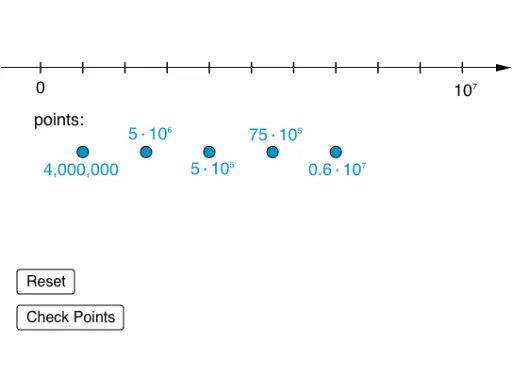
This GeoGebra example demonstrates how to compare two large numbers interactively using sliders and buttons, with results displayed as text and visualized through geometric objects such as prisms and triangles. The core mathematical concepts include number comparison, arithmetic operations (addition, subtraction, multiplication, division), sequence generation, and applications of parametric curves and trigonometry. The construction uses the Sequence command to generate number lists, buttons (button1, button2) to trigger comparisons, sliders (n, p) to adjust values, and multiple text objects (text1, text6, etc.) to show outcomes. Geometric elements (H, G, F, E, D, L, K, J, M) provide visual feedback. This resource is suitable for middle school students (e.g., grade 8) learning large number comparison and arithmetic, and can be used in math lab activities to foster intuitive understanding of numerical magnitude.
GeoGebra Commands & Parameters
Sequence((-x(Element[list8, i])) + Element[flist, i] > error, i, 1, 5) → toosmallSequence(x(Element[list8, i]) - Element[flist, i] > error, i, 1, 5) → toobigSequence(Segment[(0 + i, -0.12), (0 + i, 0.12)], i, 0, 10, 1) → list1