
Loan & Instalment Table
Loading the math board and drawing, please wait…
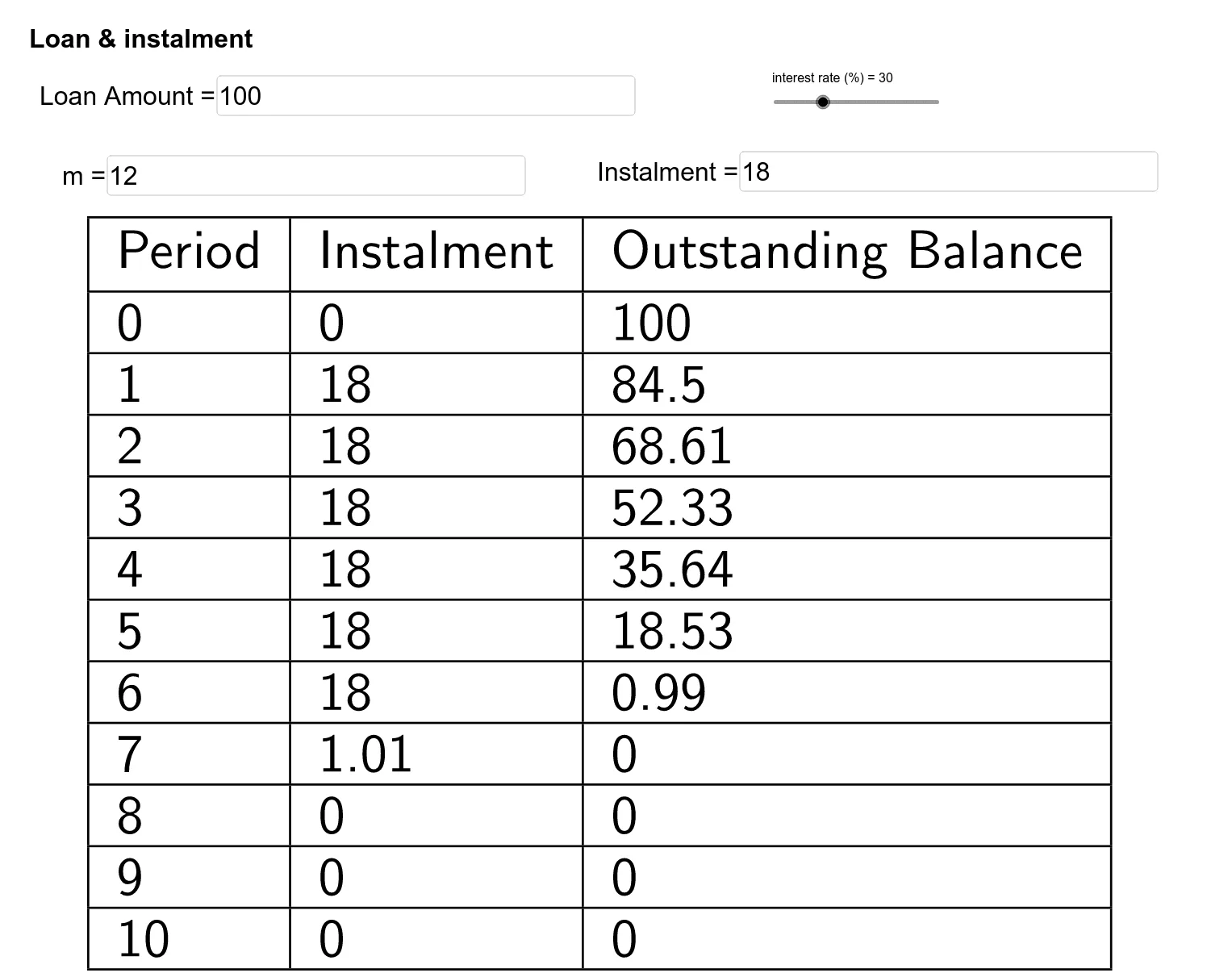
This example demonstrates a loan and instalment calculation table, visually showing changes in each payment amount, interest, and remaining loan balance. Core mathematical concepts include percentage calculations, sequences, function graphs, and coordinate geometry. It uses GeoGebra commands like If, Textfield, and TableText. Suitable for high school mathematics teaching, focusing on financial mathematics and sequence applications.
GeoGebra Commands & Parameters
If((C7 * $C$4) > $B$4, Min[$B$4, (C7 * $C$4)], Max[(C7 * $C$4), 0]) → B8If((C7 * $C$4) < $B$4, 0, (C7 * $C$4) - B8) → C8If((C8 * $C$4) > $B$4, Min[$B$4, (C8 * $C$4)], Max[(C8 * $C$4), 0]) → B9If((C8 * $C$4) < $B$4, 0, (C8 * $C$4) - B9) → C9If((C9 * $C$4) > $B$4, Min[$B$4, (C9 * $C$4)], Max[(C9 * $C$4), 0]) → B10If((C9 * $C$4) < $B$4, 0, (C9 * $C$4) - B10) → C10If((C10 * $C$4) > $B$4, Min[$B$4, (C10 * $C$4)], Max[(C10 * $C$4), 0]) → B11If((C10 * $C$4) < $B$4, 0, (C10 * $C$4) - B11) → C11If((C11 * $C$4) > $B$4, Min[$B$4, (C11 * $C$4)], Max[(C11 * $C$4), 0]) → B12If((C11 * $C$4) < $B$4, 0, (C11 * $C$4) - B12) → C12If((C12 * $C$4) > $B$4, Min[$B$4, (C12 * $C$4)], Max[(C12 * $C$4), 0]) → B13If((C12 * $C$4) < $B$4, 0, (C12 * $C$4) - B13) → C13If((C13 * $C$4) > $B$4, Min[$B$4, (C13 * $C$4)], Max[(C13 * $C$4), 0]) → B14If((C13 * $C$4) < $B$4, 0, (C13 * $C$4) - B14) → C14If((C14 * $C$4) > $B$4, Min[$B$4, (C14 * $C$4)], Max[(C14 * $C$4), 0]) → B15If((C14 * $C$4) < $B$4, 0, (C14 * $C$4) - B15) → C15If((C15 * $C$4) > $B$4, Min[$B$4, (C15 * $C$4)], Max[(C15 * $C$4), 0]) → B16Textfield(Loan) → Loan_amountTextfield(m) → InputBox1Textfield(instalment) → InputBox2If((C15 * $C$4) < $B$4, 0, (C15 * $C$4) - B16) → C16If((C16 * $C$4) > $B$4, Min[$B$4, (C16 * $C$4)], Max[(C16 * $C$4), 0]) → B17If((C16 * $C$4) < $B$4, 0, (C16 * $C$4) - B17) → C17TableText({{A6, B6, C6}, {A7, B7, C7}, {A8, B8, C8}, {A9, B9, C9}, {A10, B10, C10}, {A11, B11, C11}, {A12, B12, C12}, {A13, B13, C13}, {A14, B14, C14}, {A15, B15, C15}, {A16, B16, C16}, {A17, B17, C17}}, "|_lll") → text4
AI Drawing Prompt Reference
Create a loan and installment table to show changes in each payment amount, interest, and remaining loan balance. Input the loan amount, number of installments, and installment amount, then calculate and display the interest, actual payment amount, and remaining loan balance for each period. The table has 17 rows, each representing one period, showing the period number, interest, actual payment amount, and remaining loan balance.
The prompt above was compiled from the original drawing commands and is for reference only.