
Kite Construction and Properties by bhawna.sharma
Loading the math board and drawing, please wait…
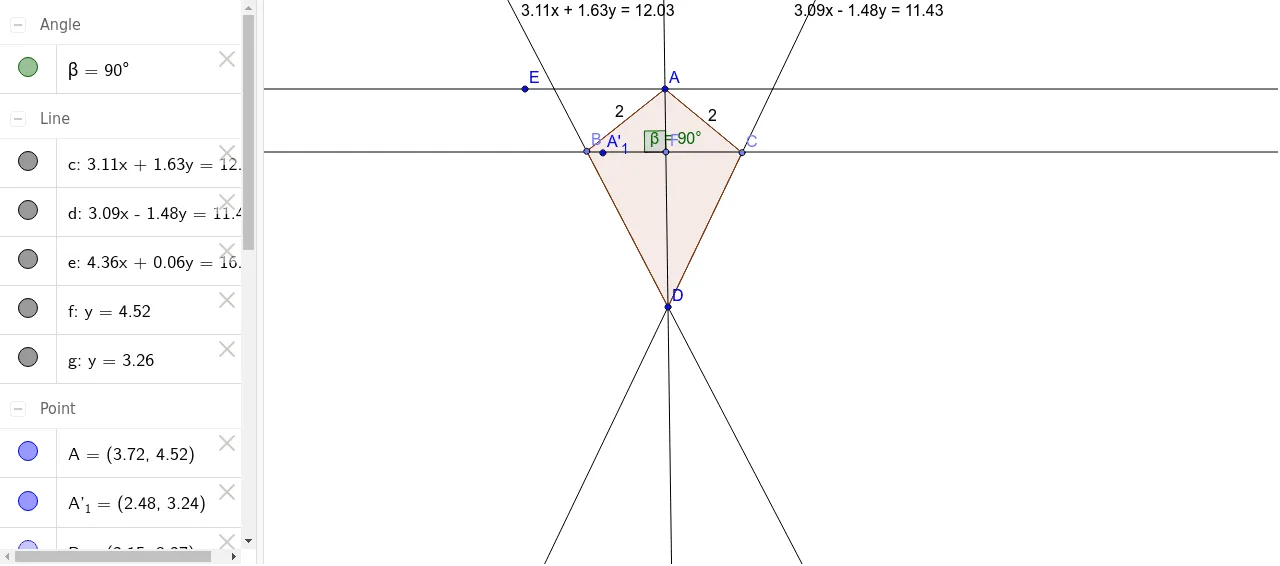
This example dynamically demonstrates the construction and properties of a kite using GeoGebra, involving core concepts like quadrilaterals, perpendicular diagonals, isosceles triangles, angle ratios, and quadratic functions. Key GeoGebra commands used include Point, Segment, Line, Rotate, Angle, and Polygon to construct the kite and illustrate diagonal rotations and angle relationships. Suitable for middle school and above students learning geometric constructions, properties, and transformations.
GeoGebra Commands & Parameters
Point(Circle[A, 2]) → BSegment(A, B) → aPoint(Circle[A, 2]) → CSegment(A, C) → bLine(B, D) → cLine(C, D) → dLine(A, D) → eLine(A, E) → fPoint(e) → FLine(F, f) → gRotate(A, 90*°, F) → A'_1Angle(A, F, A'_1) → βPolygon(B, A, C, D) → poly1, b_1, a_1, c_1, d_1
AI Drawing Prompt Reference
Start with a central point and draw a circle of radius 2; pick two points on the circle and join each to the center with segments. Then draw lines through each of those points to a pair of existing vertices, and also draw two lines through the center to those vertices. Choose a point on one of the center‑lines, draw a line through that point and the other center‑line, rotate the center 90° about the chosen point to obtain a new point, and mark the angle formed. Finally connect the two circle points, the center, and one of the vertices in order to form a quadrilateral.
The prompt above was compiled from the original drawing commands and is for reference only.