
Intersection of two lines On a circle
Loading the math board and drawing, please wait…
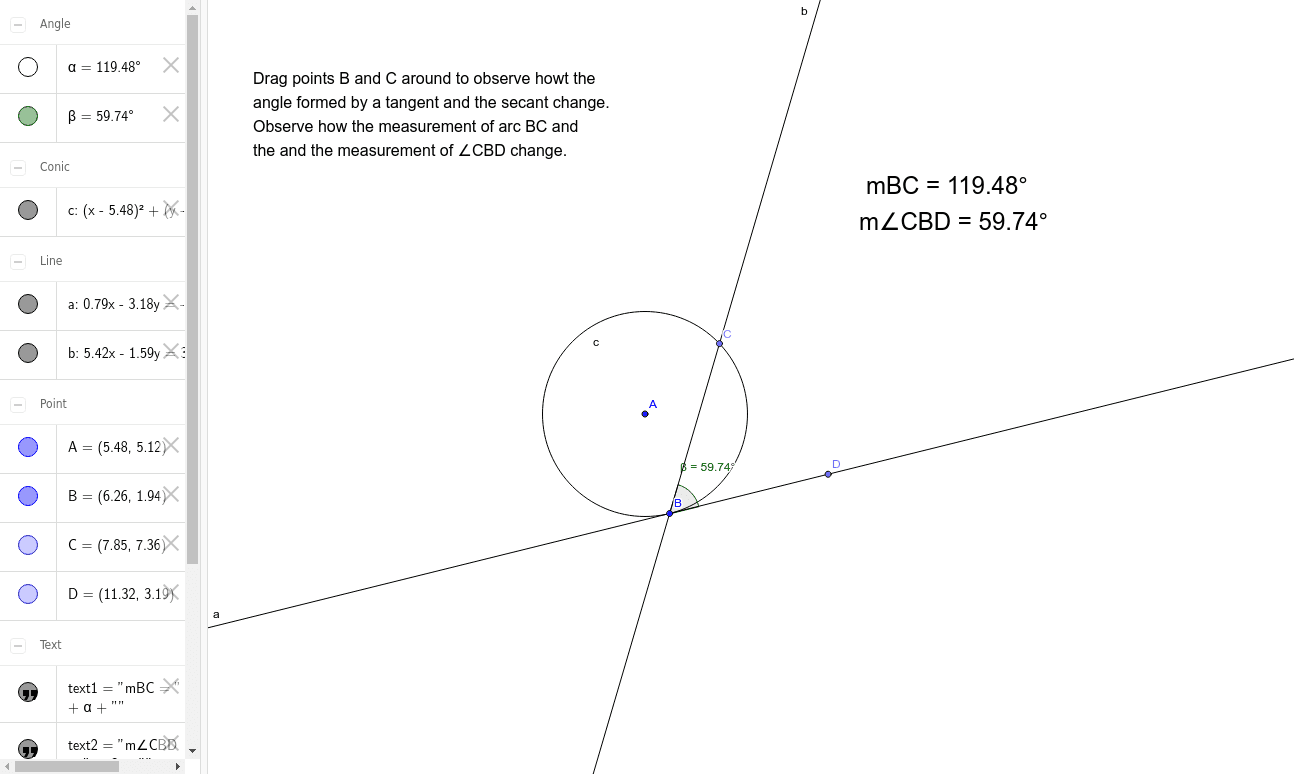
This example demonstrates the geometric phenomenon of drawing two lines on a circle and finding their intersection points. Key math concepts involved include circle, line, intersection, and angle. Construction highlights: utilizes GeoGebra commands/objects like Circle, Tangent, Point, Line, and Angle. Suitable for high school students and teachers learning analytical geometry and geometric constructions.
GeoGebra Commands & Parameters
Circle(A, B) → cTangent(B, c) → a,Point(c) → CLine(C, B) → bAngle(B, A, C) → αPoint(a) → DAngle(D, B, C) → β
AI Drawing Prompt Reference
Draw two lines on a circle and find their intersection points. Start by drawing a circle, then draw a tangent from a point on the circle, and connect this point to the center of the circle. Measure the angle formed by the center, the tangent point, and the intersection point. Then, draw another line from the tangent point, measure the angle it forms with the center and the tangent point, and finally show the intersection point of the two lines.
The prompt above was compiled from the original drawing commands and is for reference only.