
Intersecting Secants with a Circle
Loading the math board and drawing, please wait…
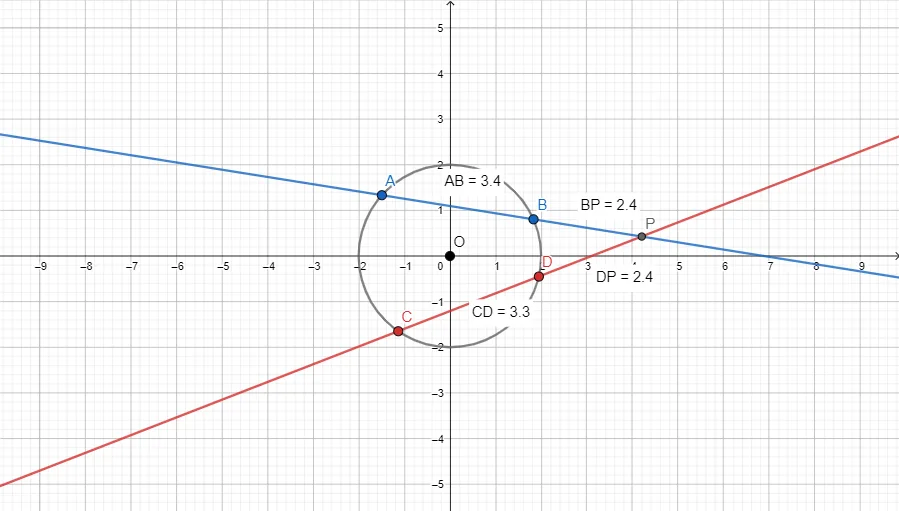
This GeoGebra example demonstrates how two secant lines intersect outside a circle, focusing on the resulting geometric configuration and visualizing metric relationships. The key mathematical ideas are circle geometry, secants and their intersection points, and two-point distance measurement with on-figure labels to support reasoning about relationships that may be expressed via products or ratios. Construction uses: Circle to create the circle; Point and Line to place the external points and draw the secant lines; Intersect to compute intersection points between the lines and the circle; and Distance to measure required segments (e.g., distanceAB, distanceCD, distanceBP, distanceDP), followed by Text labels (TextAB, TextCD, TextBP, TextDP) to display those distances directly on the diagram. Suitable for middle and high school geometry lessons, classroom demonstrations, and student exploratory learning on circles and secants.
GeoGebra Commands & Parameters
Circle(O, Scale) → cPoint(c) → APoint(c) → BLine(A, B) → fPoint(c) → CPoint(c) → DLine(C, D) → gIntersect(f, g) → PDistance(A, B) → distanceABDistance(C, D) → distanceCDDistance(B, P) → distanceBPDistance(D, P) → distanceDP
AI Drawing Prompt Reference
Draw a circle. Place four points on the circle, two on each side. Connect two of them to form one line, and connect the other two to form another line. These two lines intersect outside the circle at a point. Label the distances between the two points on the circle, and the distances from the external intersection point to each of the two circle points, showing the numeric values next to each segment. The figure shows two secants from an external point crossing the circle.
The prompt above was compiled from the original drawing commands and is for reference only.