
Integration and Area on Y-axis: Geometric Construction for Curve and Y-axis Regi
Loading the math board and drawing, please wait…
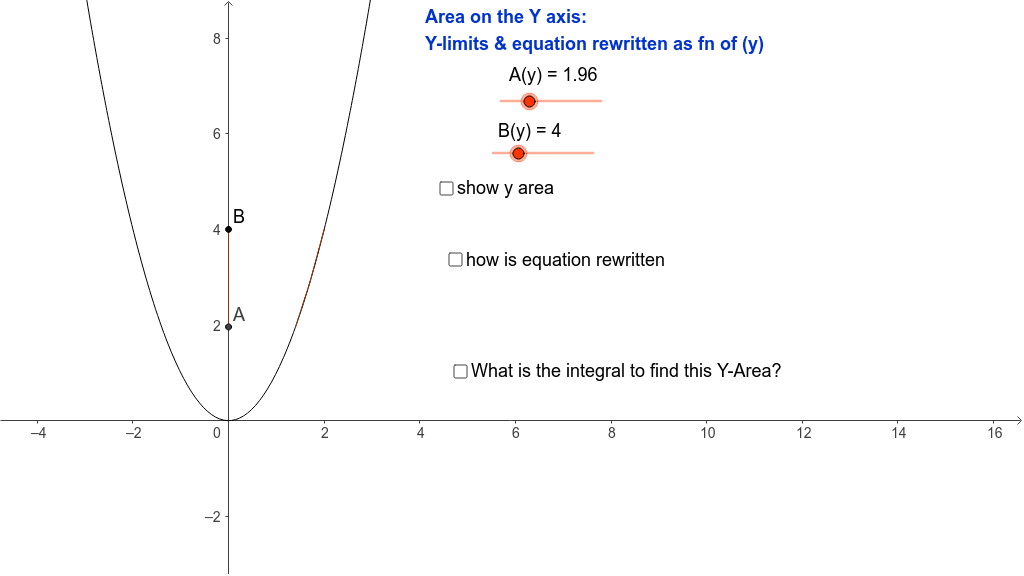
This example demonstrates how to calculate the integral and area between a curve and the Y-axis using geometric constructions. Key mathematical concepts include integration, area calculation, and geometric construction. The construction involves using commands like OrthogonalLine, Integral, Segment, and Polygon to create perpendicular lines, compute integral regions, and draw polygons. Suitable for high school students learning calculus fundamentals or for mathematical teaching demonstrations.
GeoGebra Commands & Parameters
OrthogonalLine(A, yAxis) → eOrthogonalLine(B, yAxis) → dIntegral(f, ax, bx) → aSegment(B, D) → bSegment(A, C) → cSegment(A, B) → gSegment(D, C) → hPolygon(B, D, E, F1) → poly1, b_1, d_1, e_1, f1Polygon(F1, E, C, A) → poly2, f1_1, e_2, c_1, a_1
AI Drawing Prompt Reference
Draw the area between a curve and the y-axis. First, select two points A and B on the curve, then draw perpendicular lines e and d from A and B to the y-axis respectively. Calculate the integral region a between the curve and the x-axis at points A and B. Next, connect points B and D, A and C, A and B, and D and C to form two polygons: one with vertices B, D, E, and F1, and the other with vertices F1, E, C, and A, and label them as poly1 and poly2.
The prompt above was compiled from the original drawing commands and is for reference only.