
Inscribed Angles in a Semicircle: Dynamic Theorem Verification
Loading the math board and drawing, please wait…
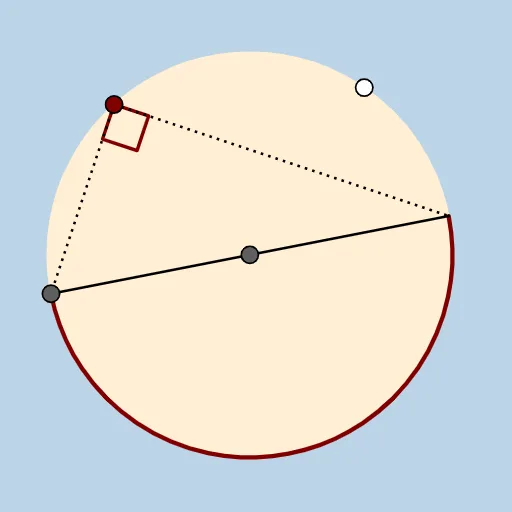
This example demonstrates the inscribed-angle property for a semicircle: when a point moves on the semicircular arc determined by a diameter, the corresponding inscribed (circumference) angles remain constant. Key concepts include semicircles and diameters, inscribed angles/cyclic quadrilateral angle relationships, isosceles-triangle reasoning, and angle measurement for proof by dynamic geometry. Construction focuses on GeoGebra tools and objects: Circle to define the circle, Point to place diameter endpoints and the moving arc point, Line to draw the diameter and connecting lines, Intersect to find intersection points, CircleArc to create the semicircular arc, Dilate to generate transformed auxiliary elements, Segment to represent sides, and Angle to compute and display the target inscribed angle(s). The activity is suitable for middle-school geometry, classroom demonstrations, and student exploration of classic circle theorems.
GeoGebra Commands & Parameters
Circle(A, B) → cPoint(c) → CLine(C, A) → aIntersect(c, a, 2) → DCircleArc(A, C, D) → dCircleArc(A, D, C) → ePoint(e) → EDilate(E, If[0 < b ≤ 1, 1 - b, 0], C) → E'Dilate(E, If[0 < b ≤ 1, 1 - b, 0], D) → E'_1Segment(E, E') → fAngle(C, E, D) → αSegment(E, E'_1) → gSegment(C, D) → h
AI Drawing Prompt Reference
Draw a circle and select two points on the circle that serve as the endpoints of a diameter. Use these endpoints to define a semicircular arc. Place a point on the semicircle arc (so it can move along the arc) and connect this moving point to both diameter endpoints, forming a triangle. Add the necessary intersection points and construct the related arcs and auxiliary transformed points so that corresponding segments can be shown. Finally, measure and display the inscribed (circumference) angle at the moving point formed by the two lines to the diameter endpoints, while keeping the diameter and key segments visible for dynamic angle verification.
The prompt above was compiled from the original drawing commands and is for reference only.