
Inscribe an Ellipse in a Quadrilateral
Loading the math board and drawing, please wait…
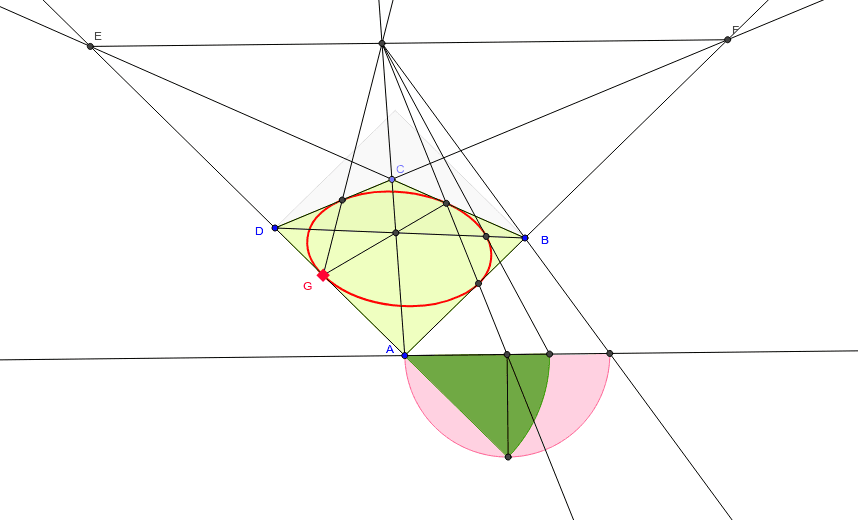
This example demonstrates how to inscribe an ellipse within a generic quadrilateral. Key mathematical concepts include geometric construction and properties of ellipses. Using GeoGebra commands such as Polygon, PointIn, Intersect, etc., an ellipse that is tangent to the quadrilateral can be constructed. Suitable for high school mathematics education and students learning about ellipse properties.
GeoGebra Commands & Parameters
Polygon(D, B, P) → poly2, p_1, d_2, b_2PointIn(poly2) → MMPolygon(A, B, C, D) → poly1, a, b, c, dRay(A, B) → eRay(D, C) → fRay(B, C) → gRay(A, D) → hIntersect(b, g) → WIntersect(g, h) → EIntersect(e, f) → FPoint(d) → GSegment(E, F) → iRay(A, C) → jIntersect(i, j) → HSegment(D, B) → kIntersect(j, k) → IRay(G, I) → lIntersect(b, g) → JIntersect(l, b) → KRay(H, K) → mLine(A, i) → pIntersect(a, e) → LIntersect(m, a) → MIntersect(p, m) → NRay(H, B) → nIntersect(p, n) → OSemicircle(O, A) → qOrthogonalLine(N, p) → rIntersect(q, r) → Q,CircleSector(A, Q, O) → sIntersect(s, p) → R,Segment(R, H) → tIntersect(k, t) → SRay(G, H) → a_1Intersect(c, f) → TIntersect(a_1, c) → UConic(U, K, M, G, S) → c_1Segment(G, K) → b_1Segment(N, Q) → d_1
AI Drawing Prompt Reference
Draw a quadrilateral ABCD, then inscribe an ellipse within it, making sure the ellipse is tangent to each side of the quadrilateral. Start by constructing the quadrilateral, then use intersections and rays to find the points of tangency, and finally use these points to draw the ellipse.
The prompt above was compiled from the original drawing commands and is for reference only.