
Incenter & Incircle Dynamic Exploration
Loading the math board and drawing, please wait…
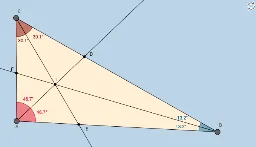
This example demonstrates the dynamic exploration of a triangle's incenter, allowing users to manipulate vertices and observe changes in the incenter, incircle, and angles. Key math concepts include incenter, incircle, angles, and triangle geometry. Construction involves commands like Segment, Slope, PointIn, Polygon, Angle, Rotate, Line, Intersect, Ray, and objects such as A, B, f, m, a, b, C, g, h, poly1, etc. Suitable for high school mathematics education to understand the properties of the incenter and its relationship with the incircle, fostering geometric intuition and dynamic thinking.
GeoGebra Commands & Parameters
Segment(A, B) → fSlope(f) → mPointIn(b) → CSegment(B, C) → gSegment(C, A) → hPolygon(A, B, C) → poly1, c, a_1, b_1Angle(poly1) → α, β, γRotate(B, α / 2, A) → B'Angle(B, A, B') → δLine(A, B') → iIntersect(g, i) → DRotate(A, γ / 2, C) → A'Angle(A, C, A') → εLine(C, A') → jIntersect(j, f) → ERotate(C, β / 2, B) → C'Angle(C, B, C') → ζLine(B, C') → kIntersect(k, h) → FRay(C, E) → nRay(B, F) → pIntersect(p, n) → IAngle(I, A, C) → ηAngle(E, C, B) → θAngle(F, B, A) → ιRay(A, I) → lLine(A, C) → qSlope(q) → m_1
AI Drawing Prompt Reference
Draw a triangle ABC by connecting vertices A, B, and C. Find the incircle and incenter I of the triangle. First, use angle bisectors and rotation to find the angle bisectors of the triangle, then find their intersection point I, which is the incenter. Next, draw perpendiculars from I to each side of the triangle, and the points where these perpendiculars meet the sides are the points of tangency E, F, and D of the incircle. Finally, connect I to each vertex of the triangle to form the incircle.
The prompt above was compiled from the original drawing commands and is for reference only.