
Image of a Translation
Loading the math board and drawing, please wait…
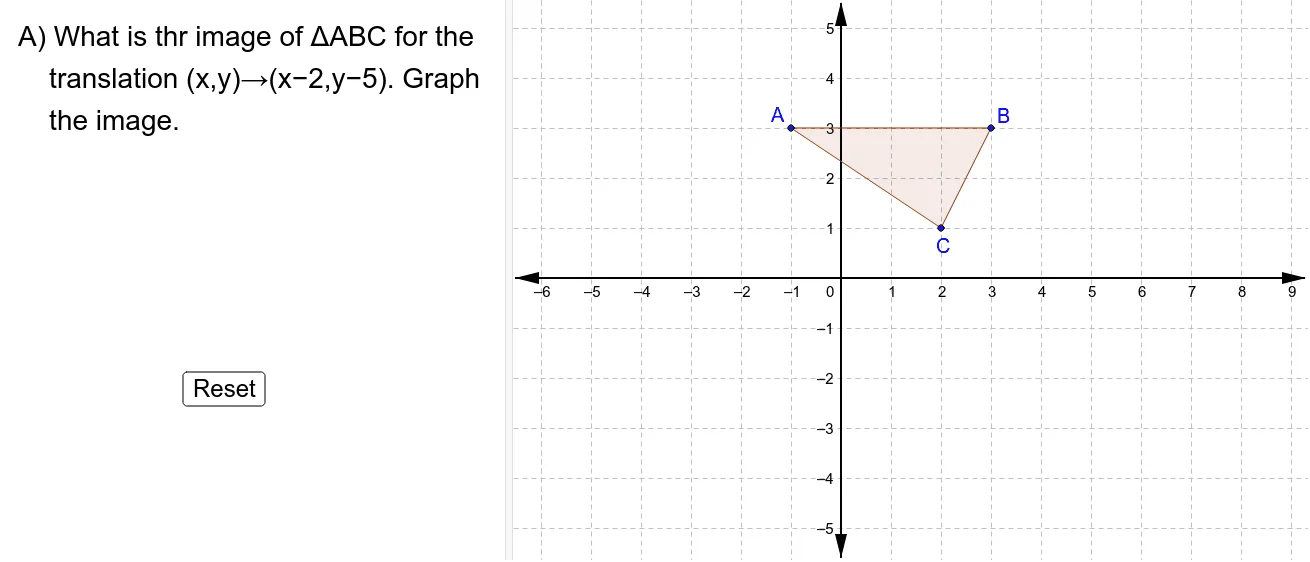
This example demonstrates the image of points, triangles, and polygons under a translation transformation. Key math concepts include translation, vector, coordinate geometry, and polygon construction. It uses commands like Polygon, Point, IsInRegion, and Slider Animation in GeoGebra. Suitable for high school students learning geometric transformations and coordinate geometry.
GeoGebra Commands & Parameters
Polygon(A, B, C) → poly1, c, a, bPolygon(A_1, B_1, C_1) → poly2, c_1, a_1, b_1Point(xAxis) → GPoint(xAxis) → HPoint(xAxis) → KPolygon(D, E, F, G, H, I, J, K, L, M) → poly3, d, m, e, f, g, h, i, j, k, lIsInRegion(A_1, poly3) → ShowAIsInRegion(B_1, poly3) → ShowBIsInRegion(C_1, poly3) → ShowC
AI Drawing Prompt Reference
Draw triangle ABC, then translate it to form triangle A1B1C1. Next, draw three points G, H, and K on the x-axis. Finally, draw a polygon DEFGHIJKLM and check if triangle A1B1C1 is inside it, showing the result.
The prompt above was compiled from the original drawing commands and is for reference only.