
IM 6.1.8 Lesson: Area of Triangles
Loading the math board and drawing, please wait…
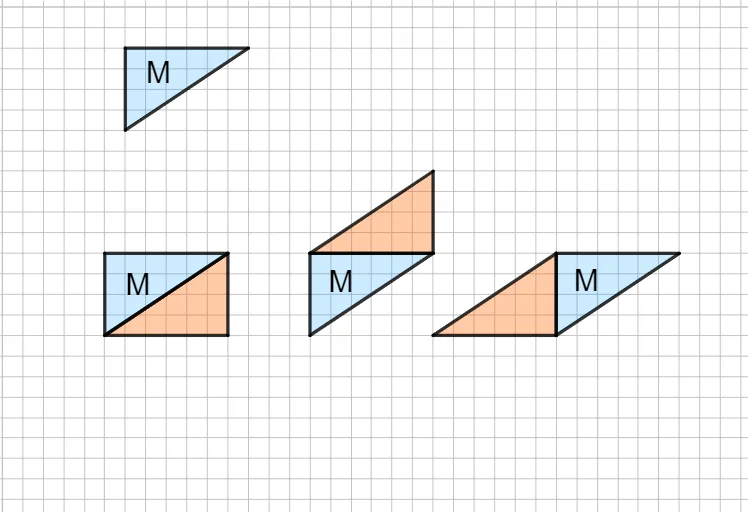
① This example demonstrates how to construct triangles and compute their area using GeoGebra, visually illustrating the geometric meaning of the triangle area formula. ② The core mathematical concept is the area of triangles, involving base, height, and the area formula. ③ Construction highlights: from the construction summary, commands such as Segment and CustomTriangle are used, creating multiple points (e.g., B, C, G) and auxiliary objects (various segments and triangles), likely to dynamically show the relationship between area and base/height. ④ Suitable for middle school students (grade 6) learning triangle area, and for teachers to demonstrate the derivation of the area formula in class.
GeoGebra Commands & Parameters
Segment(B, C) → gCustomTriangle(E_2, F_2, G_2) → f_5, g_5, h_5, t2CustomTriangle(G_2, E_2, H_2) → i_5, j_5, k_5, t3CustomTriangle(I_2, J_2, K_2) → l_5, m_5, n_5, t4CustomTriangle(J_2, K_2, L_2) → p_5, q_5, r_5, t5CustomTriangle(M_2, N_2, O_2) → s_5, t_5, a_5, t6CustomTriangle(M_2, P_2, N_2) → b_5, c_5, d_5, t7CustomTriangle(Q_2, R_2, S_2) → e_5, f_6, g_6, t8
AI Drawing Prompt Reference
Draw a triangle and calculate its area using the base and height. First, connect points B and C to form the base. Then, use the custom triangle tool to draw five triangles, each sharing a side with the previous one, to dynamically show the relationship between the triangle area and its base and height.
The prompt above was compiled from the original drawing commands and is for reference only.