
Hypotrochoid Ellipse
Loading the math board and drawing, please wait…
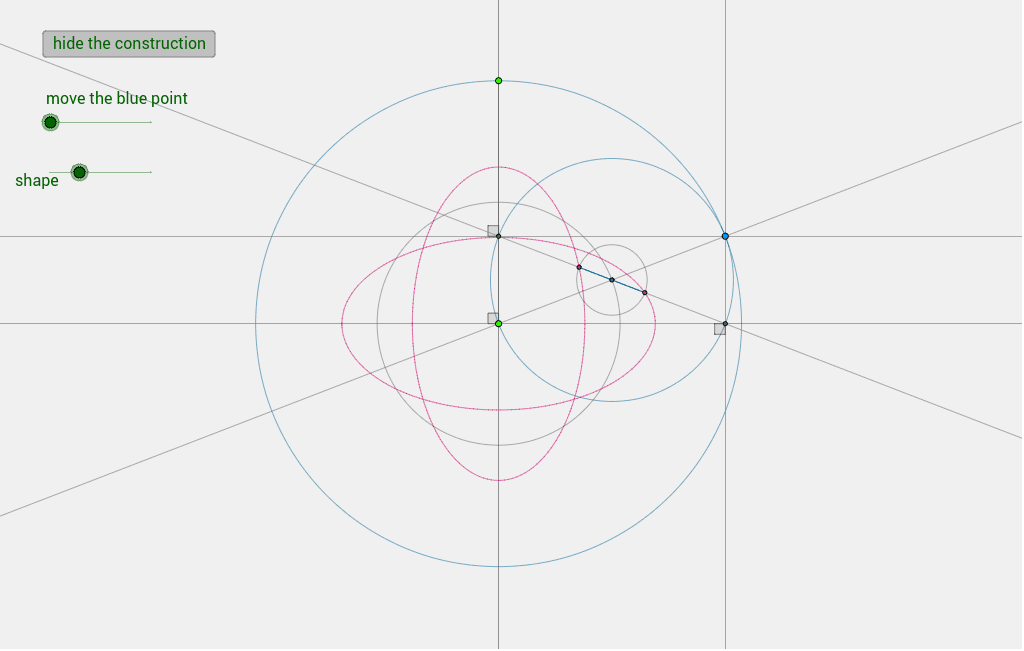
This example demonstrates the formation of an ellipse through the locus of a point on the circumference of a circle rolling inside another circle. It involves core concepts like ellipses, sequences, symmetry, and trigonometry. Construction uses commands such as Segment, Circle, Point, Line, Intersect, OrthogonalLine, Angle, and Locus with objects like t, A, O, h, k, c, etc. Suitable for high school and above to explore parametric equations and locus problems.
GeoGebra Commands & Parameters
Segment(O, A) → hCircle(O, (1 / 2 * h)) → kCircle(O, A) → cPoint(c) → BLine(O, B) → iIntersect(k, i, 2) → FLine(O, A) → aOrthogonalLine(O, a) → bOrthogonalLine(B, a) → dOrthogonalLine(B, b) → eIntersect(a, d) → CIntersect(b, e) → DLine(D, C) → fCircle(F, B) → pAngle(h, b) → αAngle(d, h) → βAngle(e, b) → γCircle(F, (t * Distance[B, F])) → qIntersect(q, f) → G, HLocus(G, B) → loc2Locus(H, B) → loc3Segment(G, H) → g
AI Drawing Prompt Reference
Draw an ellipse by tracing the path of a point on the circumference of a circle rolling inside another circle. Start by drawing a circle and a line segment, then create a smaller circle and find their intersection points. Construct lines and perpendiculars through these points, locate several intersections, and draw lines connecting them. Finally, based on an angle parameter, draw a circle, find its intersections with the previous lines, and trace the locus of these intersection points to form the ellipse.
The prompt above was compiled from the original drawing commands and is for reference only.