
How Much Cake Can You Have? Interactive Fraction Multiplication with Circles
Loading the math board and drawing, please wait…
In collections
Natürliche Zahl mit Bruchzahl multiplizieren
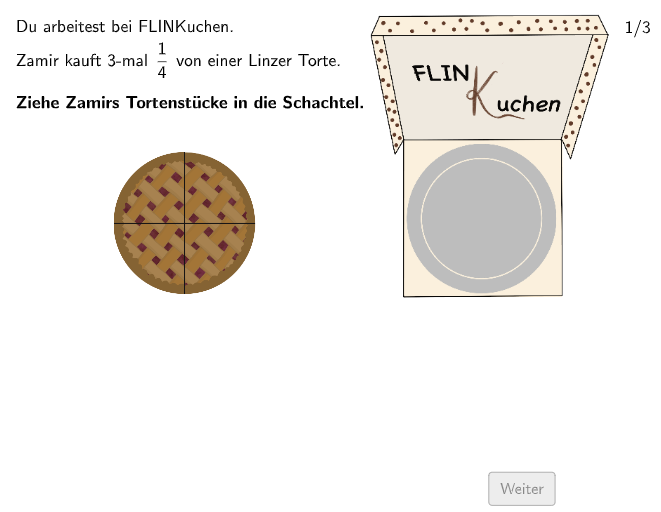
① This example presents a cake-cutting scenario to visually demonstrate fraction multiplication and its connection to circular geometry, allowing users to input fractions and observe how the cake is divided and portions are taken. ② Core math concepts include fraction multiplication, simplification, rational numbers, and partitioning of circular regions, along with basic correctness checking of answers. ③ Construction highlights: uses GeoGebra commands such as Circle to draw the cake, Polygon to create slices, Point and PointIn to test point locations, CountIf to count points in regions, Textfield for user input, Translate for moving objects, Element to extract list items, and multiple objects (input1, input2, sol1, sol2, listMA, etc.) to build interactive feedback. ④ Suitable for upper elementary to middle school students learning fraction multiplication and geometric intuition, as well as for classroom demonstrations or self-paced exploration.
GeoGebra Commands & Parameters
Circle(KM, rad1 + 0.3) → cCountIf(M ∈ c, M, listMA) → inACountIf(M ∈ c, M, listMB) → inBCountIf(M ∈ c, M, listMC) → inCElement({inA, inB, inC}, exnum) → numInPolygon(P1, (x(P2), y(P1)), P2, (x(P1), y(P2))) → v1, p1, f, p2, gTextfield(input1) → Eingabefeld1Textfield(input2) → Eingabefeld2Point(Line[K1, xAxis]) → K2Element({T2a, T2b, T2c}, step) → T2PointIn(v1) → CPointIn(Translate[v1, w1]) → A1PointIn(v1) → A2PointIn(Translate[v1, w1]) → A3PointIn(v1) → A4PointIn(v1) → A6PointIn(v1) → A8PointIn(Translate[v1, w1]) → A5PointIn(Translate[v1, w1]) → A7PointIn(Translate[v1, w1]) → B1PointIn(v1) → B2PointIn(v1) → B4PointIn(v1) → B6PointIn(v1) → B8PointIn(v1) → B10PointIn(Translate[v1, Vector[w1 - (0.15, 0)]]) → B3PointIn(Translate[v1, (-2, 0)]) → B5PointIn(Translate[v1, (-1.85, 0)]) → B7PointIn(Translate[v1, (-1.66, 0)]) → B9PointIn(v1) → C6PointIn(Translate[v1, w1]) → C1PointIn(Translate[v1, w1]) → C5PointIn(v1) → C2PointIn(v1) → C4PointIn(Translate[v1, (-2.85, 0)]) → C3Translate(Segment[(0, 0), (0.9, 0)], T1 + (6.59, -1.03)) → h
AI Drawing Prompt Reference
Draw an interactive teaching scene of cake cutting for fraction multiplication. First, draw a circle as the main cake, with two text input boxes near the circle for users to enter two fractions. Inside the circle, use polygon lines to cut several fan-shaped slices representing different portions of the cake. Place random test points in each slice region and outside areas; these points will verify if the user's fraction selections correctly correspond to the chosen regions. The entire graphic shows a circle divided into sections with user interaction inputs.
The prompt above was compiled from the original drawing commands and is for reference only.