
Grid Construction
Loading the math board and drawing, please wait…
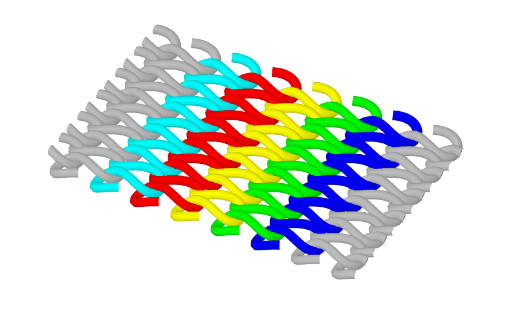
This example demonstrates the process of grid construction. It involves key mathematical concepts such as similar triangles, sequences, and rotation. Using the CurveCartesian and Sequence commands, a series of points and curves are constructed. Suitable for high school mathematics education to help students understand the principles of grid generation.
GeoGebra Commands & Parameters
CurveCartesian(t - (a * sin((type * t))), (b * sin(t)), (h * cos((type * t))), t, ((-n) * π), (n * π)) → c3CurveCartesian(t - (a * sin((type * t))), (b * sin(t)) + d, (h * cos((type * t))), t, ((-n) * π), (n * π)) → c2CurveCartesian(t - (a * sin((type * t))), (b * sin(t)) + (2 * d), (h * cos((type * t))), t, ((-n) * π), (n * π)) → c1CurveCartesian(t - (a * sin((type * t))), (b * sin(t)) - d, (h * cos((type * t))), t, ((-n) * π), (n * π)) → c4CurveCartesian(t - (a * sin((type * t))), (b * sin(t)) - (2 * d), (h * cos((type * t))), t, ((-n) * π), (n * π)) → c5Sequence(CurveCartesian[t - (a * sin((type * t))), (b * sin(t)) + (i * d), (h * cos((type * t))), t, ((-n) * π), (n * π)], i, 3, 6) → liste1Sequence(CurveCartesian[t - (a * sin((type * t))), (b * sin(t)) - (i * d), (h * cos((type * t))), t, ((-n) * π), (n * π)], i, 3, 6) → liste2
AI Drawing Prompt Reference
Draw a grid structure consisting of a series of sine curves with vertical offsets to create layered effects. Start with a central curve, then draw multiple curves above and below it, each with increasing or decreasing fixed offsets. The design should reflect symmetry and wave patterns, illustrating the grid construction process using rotation and similar triangles, suitable for mathematics education.
The prompt above was compiled from the original drawing commands and is for reference only.