
Geometry Construction Example: Triangle and Centers
Loading the math board and drawing, please wait…
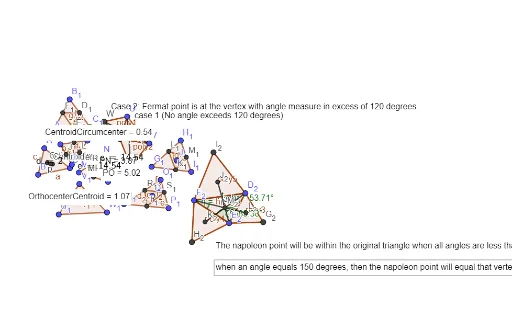
This example demonstrates how to construct a triangle and find its orthocenter, circumcenter, and centroid using GeoGebra commands. It involves core math concepts like triangles, angles, similar triangles, equilateral triangles, LCM, and GCD. Key GeoGebra commands and objects used include Polygon, OrthogonalLine, Intersect, Midpoint, Segment, Distance, LaTeX, Line, Angle, Rotate, Centroid, InteriorAngles, and Text. Suitable for high school students learning geometric constructions and properties of triangle centers.
GeoGebra Commands & Parameters
Polygon(A, B, C) → t1, c, a, bOrthogonalLine(A, a) → fOrthogonalLine(C, c) → gOrthogonalLine(B, b) → hIntersect(f, h) → OrthocenterMidpoint(c) → DMidpoint(b) → EMidpoint(a) → FOrthogonalLine(F, a) → iOrthogonalLine(E, b) → jOrthogonalLine(D, c) → kIntersect(j, i) → CircumcenterSegment(A, F) → lSegment(B, E) → mSegment(C, D) → nIntersect(l, n) → CentroidSegment(Orthocenter, Circumcenter) → pDistance(Orthocenter, Centroid) → distanceOrthocenterCentroidDistance(Centroid, Circumcenter) → distanceCentroidCircumcenterLaTeX(d, true, true) → text1Polygon(G, H, I) → t2, i_1, g_1, h_1Midpoint(h_1) → JMidpoint(i_1) → KMidpoint(g_1) → LPolygon(J, K, L) → t3, l_1, j_1, k_1Polygon(M, N, O) → t4, o, m_1, n_1Distance(M, P) → distanceMPDistance(P, N) → distancePNDistance(P, O) → distancePOLaTeX(e, true, true) → text2LaTeX(e, true, true) → text3Midpoint(n_1) → QMidpoint(o) → RMidpoint(m_1) → SPolygon(T, U, V) → t5, v, t, uPolygon(T, U, 3) → poly1, q, r, s, WPolygon(V, T, 3) → poly2, f_1, p_1, q_1, ZSegment(Z, U) → r_1Segment(W, V) → s_1LaTeX(text5, true, true) → text6Polygon(A_1, B_1, C_1) → t6, c_1, a_1, b_1OrthogonalLine(B_1, b_1) → t_1OrthogonalLine(C_1, c_1) → d_1OrthogonalLine(A_1, a_1) → e_1Intersect(a_1, e_1) → D_1Intersect(t_1, b_1) → E_1Intersect(c_1, d_1) → F_1Polygon(F_1, D_1, E_1) → t7, f_2, g_2, h_2Polygon(G_1, H_1, I_1) → t8, i_2, j_2, k_2OrthogonalLine(J_1, k_2) → l_2OrthogonalLine(J_1, j_2) → m_2OrthogonalLine(J_1, i_2) → n_2Intersect(l_2, k_2) → K_1Intersect(n_2, i_2) → L_1Intersect(m_2, j_2) → M_1Polygon(L_1, M_1, K_1) → t9, p_2, q_2, r_2Polygon(N_1, O_1, P_1) → t10, s_2, t_2, o_1Line(N_1, Q_1) → a_2Line(P_1, Q_1) → b_2Line(O_1, Q_1) → c_2Intersect(b_2, s_2) → R_1Intersect(a_2, t_2) → S_1Intersect(c_2, o_1) → T_1Polygon(R_1, T_1, S_1) → t11, d_2, e_2, f_3Polygon(U_1, V_1, W_1) → t12, w_1, u_1, v_1Angle(U_1, V_1, W_1) → αRotate(U_1, (1 / 3 * α), V_1) → A_2Rotate(W_1, (-((1 / 3 * α))), V_1) → Z_1Angle(W_1, U_1, V_1) → βRotate(W_1, (1 / 3 * β), U_1) → B_{2}Rotate(V_1, (-1 / 3 * β), U_1) → C_2Angle(V_1, W_1, U_1) → γPolygon(D_2, E_2, F_2) → t13, g_3, h_3, i_3Polygon(D_2, E_2, 3) → poly3, j_3, k_3, l_3, G_2Polygon(E_2, F_2, 3) → poly4, m_3, n_3, p_3, H_2Polygon(F_2, D_2, 3) → poly5, q_3, r_3, s_3, I_2Centroid(F_2, D_2, I_2) → J_2Centroid(H_2, E_2, F_2) → K_2Centroid(E_2, D_2, G_2) → L_2Segment(L_2, F_2) → t_3Segment(E_2, J_2) → b_3Segment(K_2, D_2) → a_3Intersect(b_3, a_3) → M_2InteriorAngles(t13) → ε, ζ, ηText("The napoleon point will be within the original triangle when all angles are less than 150 degrees.") → text7Text("when an angle equals 150 degrees, then the napoleon point will equal that vertex.") → text8