
Geometric Demo of Ratios in Right Triangles
Loading the math board and drawing, please wait…
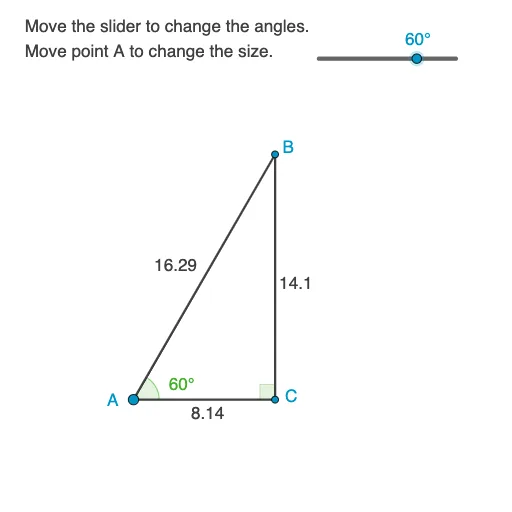
This example demonstrates ratio relationships inside a right triangle by constructing key points and auxiliary lines using circles and rotations. It helps learners visualize how proportions between segments are determined by the triangle’s geometry and the corresponding angle positions. The core math concepts include ratios in right triangles, angle relationships, orthogonal (perpendicular) constructions, and constructing needed intersection points to obtain measurable lengths. Construction highlights: Circle is used to draw circles that support the configuration; Segment defines triangle edges and the measurable parts; Rotate generates rotated positions to enforce geometric correspondence; Angle labels the relevant angles (α, β, γ); OrthogonalLine creates perpendicular/orthogonal helper lines; and Intersect computes intersection points to locate vertices and other key points (A, B, C and related points). Labeled angle symbols and text annotations (e.g., text1–text6, with parameters like h and k) are included to emphasize which lengths and ratios are being compared. Suitable for middle to high school geometry lessons and classroom demonstrations aimed at building intuition before formal treatments of similarity and trigonometric ratio ideas.
GeoGebra Commands & Parameters
Circle(A, D) → c_1Segment(A, D) → a_1Rotate(D, α, A) → BAngle(D, A, B) → βSegment(A, B) → cOrthogonalLine(B, a_1) → dIntersect(a_1, d) → CAngle(B, C, A) → γSegment(C, B) → aSegment(C, A) → b
AI Drawing Prompt Reference
Draw a right triangle, marking the two legs and the hypotenuse. Construct a circle and a line segment, then rotate a point to create a new point. Connect these points and add a perpendicular line to find the intersection. Finally, label the angles and lengths to emphasize ratio relationships.
The prompt above was compiled from the original drawing commands and is for reference only.