
Geometric Construction with Percentages and Pythagorean Theorem
Loading the math board and drawing, please wait…
In collections
Drawings vs. Constructions
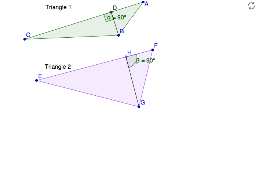
This example demonstrates how to use GeoGebra to create geometric figures related to percentages and the Pythagorean theorem. Key mathematical concepts include percentage calculation and the application of the Pythagorean theorem. Construction highlights include using commands like Polygon, OrthogonalLine, and Intersect to draw polygons, perpendicular lines, and intersections. Suitable for middle and high school students learning geometry and algebra.
GeoGebra Commands & Parameters
Polygon(A, B, C) → poly1, c, a, bOrthogonalLine(B, b) → dIntersect(d, b) → DAngle(C, D, B) → αSegment(D, B) → ePolygon(E, F, G) → poly2, g, e_1, fPoint(g) → HSegment(H, G) → hAngle(g, h) → β
AI Drawing Prompt Reference
Draw triangle ABC, then construct a perpendicular line from B to BC, intersecting at D. Calculate the angle CDB as α and draw line segment BD. Next, draw a new triangle EFG with D as the center and BD as the radius, then connect point H to G and calculate the angle HGF as β.
The prompt above was compiled from the original drawing commands and is for reference only.