
Geometric Construction of Angle Bisector
Loading the math board and drawing, please wait…
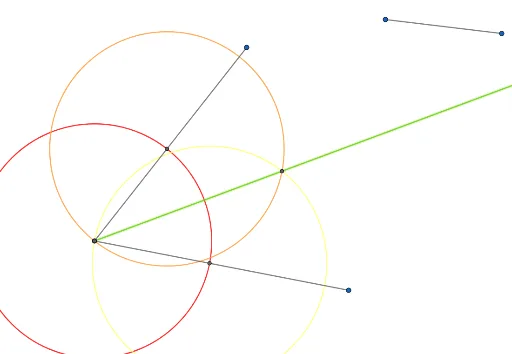
This example demonstrates the geometric construction of an angle bisector using standard tools. It covers core concepts like angle properties and congruent triangles. The construction utilizes GeoGebra commands including Segment, Circle, Intersect, and Ray, involving points A, B, C, and intersections to form rays. Ideal for students learning Euclidean geometry and understanding the definition and properties of angle bisectors through dynamic visualization.
GeoGebra Commands & Parameters
Segment(A, B) → fSegment(B, C) → gSegment(D, E) → hCircle(B, h) → cIntersect(c, f) → F,Intersect(c, g) → G,Circle(F, h) → dCircle(G, h) → eIntersect(d, e) → H, I, ,Ray(B, H) → i
AI Drawing Prompt Reference
Draw an angle and construct its bisector using circles and segments. Start by drawing two segments to form the angle's sides, then draw a circle with one side as the diameter. Connect the intersection points of the circle with the other side to the vertex, and draw circles centered at these points. The intersection of these two circles gives points on the bisector, which connects to the vertex to form the angle bisector.
The prompt above was compiled from the original drawing commands and is for reference only.