
Geometric Construction: Drawing a Square (Problem 3)
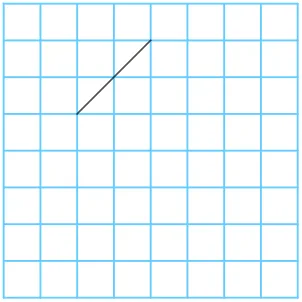
This GeoGebra applet, titled Geometric Construction: Drawing a Square (Problem 3), provides a comprehensive and interactive demonstration of how to construct a perfect square using precise geometric construction methods. By utilizing core GeoGebra commands and tools such as Point, Segment, Angle, Rotate, and Polygon, the applet dynamically builds the vertices and edges of a square in a clear, step-by-step manner. This example beautifully illustrates the fundamental geometric properties and the logical construction process of a square, making it an excellent resource for teaching and learning plane geometry while helping students deeply understand the generative principles of regular polygons.
In this interactive environment, users are not just passive observers; they can actively engage with the construction. By dragging the initial independent points, students can resize, reorient, or reposition the base segment of the square. As they manipulate these foundational elements, they can observe in real time how all dependent vertices, angles, and edges dynamically adjust. Crucially, the applet ensures that the defining mathematical properties of a square are strictly maintained throughout any transformation, specifically preserving the four equal side lengths and the four exact ninety-degree interior angles.
The integration of the Rotate command is particularly instructive, as it visually highlights the rotational symmetry inherent in regular polygons. It demonstrates how a single line segment can be mathematically transformed around a specific center point to generate the entire geometric figure. For students, this visual and hands-on approach bridges the gap between abstract geometric theorems and concrete visual representations. It encourages exploratory learning, allowing learners to test geometric hypotheses, observe invariant properties under continuous transformation, and visualize the underlying logic of compass-and-straightedge constructions.
Educators can seamlessly integrate this applet into their lesson plans as a dynamic teaching aid to introduce topics such as rigid transformations, coordinate geometry, and the formal definitions of regular polygons. By interacting with the construction sequence, students develop stronger spatial reasoning skills and a more intuitive grasp of Euclidean geometry. Ultimately, this applet transforms a static textbook problem into an engaging, dynamic mathematical experience that solidifies foundational geometry concepts.
In collections
Constructing Squares in GeoGebra
Loading the math board and drawing, please wait…