
Geogebra Demonstration of Triangular Prism
Loading the math board and drawing, please wait…
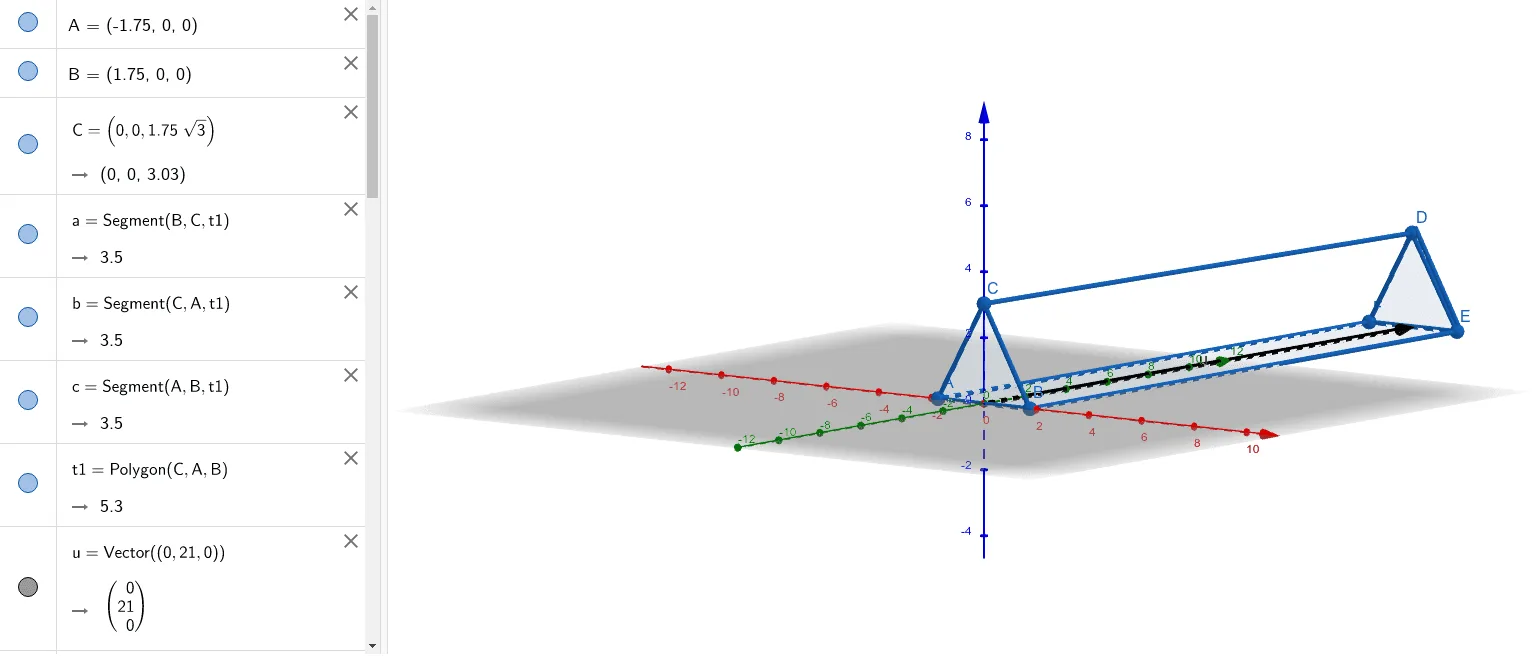
This example dynamically demonstrates the geometric construction and properties of a triangular prism using GeoGebra. It involves core math concepts like prism, vectors, percentages, squares, and angles. The construction utilizes commands and objects such as Polygon, Vector, Translate, and PointIn. Suitable for middle school and above students for learning solid geometry and spatial visualization.
GeoGebra Commands & Parameters
Polygon(C, A, B) → t1, b, c, aVector((0, 21, 0)) → uTranslate(t1, u) → t1'PointIn(t1') → DPointIn(t1') → EPolygon(C, D, E, B) → q1, c_1, d, e, b_1PointIn(t1') → FPolygon(A, B, E, F) → q2, a_1, b_2, e_1, fPolygon(C, A, F, D) → q3, c_2, a_2, f_1, d_1
AI Drawing Prompt Reference
Draw a triangular prism by first creating the base triangle, then translating it upward to form the top face, connecting corresponding vertices to outline the sides, and finally highlighting the geometric structure and spatial relationships, emphasizing vectors, angles, and the construction process.
The prompt above was compiled from the original drawing commands and is for reference only.