
Geoboard Area 3B: Polygon Area and Quadratic Functions
Loading the math board and drawing, please wait…
In collections
Geoboard Area
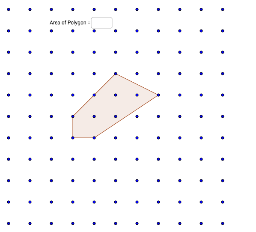
①This example demonstrates how polygon areas on a geoboard relate to quadratic functions, matrices, tangent lines, and polynomial functions. ②Core concepts include area calculation, quadratic function graphs, matrix representation, tangent lines, and polynomial functions, with a nod to cylinder surface area. ③Construction uses GeoGebra commands Polygon, Textfield, and Area, involving points like I_3, F_3, R, Q, H and polygon poly2, plus auxiliary objects i_3, f_3, h_1, etc., allowing dynamic point movement to observe area changes. ④Ideal for secondary school mathematics (upper middle to high school) to explore area-function connections, matrix applications, and geometric visualization, useful for interactive teaching or student self-study.
GeoGebra Commands & Parameters
Polygon(I_3, F_3, H, Q, R) → poly2, i_3, f_3, h_1, q, rTextfield() → InputBox1Area(poly2) → polyArea
AI Drawing Prompt Reference
Draw a coordinate grid with a five-sided polygon whose vertices are placed at various points across the quadrants and axes, forming an irregular closed shape. One side of the polygon should be tangent to a quadratic curve that passes through two of the polygon's vertices and extends beyond the axes. Include an input box near the polygon that displays the area value of the polygon. When any vertex is dragged, the polygon's shape changes, the area updates, and the quadratic curve and tangent line adjust accordingly to maintain their relationship with the polygon. The overall composition should clearly illustrate the connection between polygon area, quadratic functions, matrices, and tangent lines, suitable for secondary school mathematics instruction.
The prompt above was compiled from the original drawing commands and is for reference only.