
Fraction Operations and Relative Proportion Geometric Construction Example
Loading the math board and drawing, please wait…
In collections
Zahlenstrahl und Ordnen von Brüchen
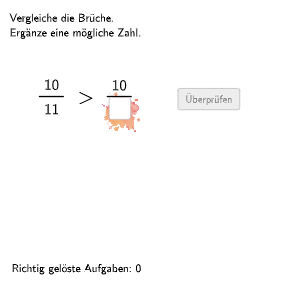
This example demonstrates how to visually represent fractions as relative proportions and frequencies using geometric figures. The key mathematical concepts involve understanding fractions as relative proportions and frequencies, and the application of geometric construction in education. Construction points include using GeoGebra commands such as Shuffle, Element, If, Textfield, etc., to dynamically generate fractions and graphics. Suitable for students in grades 5-6 to develop number sense and fraction operations skills.
GeoGebra Commands & Parameters
Shuffle(Sequence[Random[2, 13], i, 1, 100]) → randomNosForNenner2, {10, 3, 12, 12, 2, 12, 3, 2, 4, 6, 3, 12, 12, 11, 6, 3, 13, 12, 5, 6, 5, 13, 5, 13, 10, 3, 4, 11, 12, 3, 10, 12, 6, 6, 11, 3, 8, 7, 9, 9, 8, 9, 4, 9, 13, 10, 4, 11, 8, 7, 9, 2, 11, 4, 12, 13, 9, 4, 6, 2, 8, 4, 3, 3, 5, 8, 9, 13, 6, 5, 5, 7, 4, 9, 9, 10, 11, 5, 12, 9, 7, 2, 11, 3, 7, 7, 4, 8, 6, 8, 3, 8, 10, 6, 9, 13, 3, 9, 10, 9}Shuffle(Sequence[Random[2, 13], i, 1, 100]) → randomNosForNenner1, {3, 11, 12, 9, 9, 10, 2, 3, 10, 10, 5, 6, 2, 11, 2, 5, 6, 12, 9, 6, 7, 13, 3, 13, 8, 11, 2, 10, 5, 2, 12, 12, 6, 6, 12, 2, 8, 2, 13, 9, 3, 11, 4, 13, 8, 2, 2, 12, 6, 4, 2, 10, 9, 5, 5, 13, 10, 2, 9, 13, 12, 10, 8, 4, 5, 10, 9, 4, 4, 12, 11, 5, 7, 8, 11, 11, 13, 8, 11, 6, 2, 10, 3, 7, 11, 5, 3, 12, 7, 5, 4, 12, 5, 10, 11, 10, 6, 7, 7, 8}Element(randomNosForNenner2, Mod[questionCount, 100] + 1) → nenner2Element(randomNosForNenner1, Mod[questionCount, 100] + 1) → nenner1Element(randomNosForZaehler1, Mod[questionCount, 100] + 1) → zaehler1Element(randomNosForZaehler2, Mod[questionCount, 100] + 1) → zaehler2Element(randomNosForLay, Mod[questionCount, 100] + 1) → layShuffle(Sequence[Random[1, 4], i, 1, 100]) → randomNosForPos, {2, 4, 4, 4, 3, 2, 4, 2, 4, 3, 2, 3, 4, 1, 4, 2, 2, 1, 4, 1, 3, 2, 1, 4, 1, 3, 2, 2, 1, 2, 1, 3, 4, 2, 3, 2, 3, 2, 3, 4, 2, 4, 4, 3, 4, 4, 2, 2, 4, 2, 1, 2, 4, 4, 1, 3, 1, 3, 4, 3, 1, 4, 4, 4, 1, 3, 3, 2, 2, 4, 2, 1, 3, 1, 4, 3, 1, 3, 4, 4, 2, 3, 1, 4, 1, 4, 4, 2, 2, 1, 4, 2, 3, 3, 2, 1, 4, 2, 2, 1}Element(randomNosForPos, Mod[questionCount, 100] + 1) → posIf(lay ≟ 1 ∧ (pos ≟ 2 ∨ pos ≟ 4), zaehler1, zaehler2) → chosenZaehler2If(lay ≟ 3 ∧ (pos ≟ 1 ∨ pos ≟ 2), IPos2Oben, If[lay ≟ 3 ∧ (pos ≟ 3 ∨ pos ≟ 4), IPos2Oben, If[lay ≟ 2 ∧ (pos ≟ 1 ∨ pos ≟ 2), IPos1Oben, If[lay ≟ 2 ∧ (pos ≟ 3 ∨ pos ≟ 4), IPos1Oben, If[lay ≟ 1 ∧ pos ≟ 1, IPos1Oben, If[lay ≟ 1 ∧ pos ≟ 2, IPos1Oben, If[lay ≟ 1 ∧ pos ≟ 3, IPos2Oben, If[lay ≟ 1 ∧ pos ≟ 4, IPos2Oben]]]]]]]) → SelectedBackgroundPosShuffle(Sequence[Random[1, 2], i, 1, 100]) → randomNosForSymbol, {2, 2, 2, 1, 1, 1, 1, 2, 1, 1, 1, 1, 1, 1, 2, 1, 2, 1, 1, 2, 1, 1, 2, 2, 2, 2, 1, 2, 1, 2, 2, 2, 1, 1, 1, 2, 1, 2, 2, 1, 1, 1, 1, 2, 2, 1, 2, 1, 1, 1, 2, 2, 1, 1, 1, 2, 2, 1, 2, 1, 1, 2, 2, 1, 2, 2, 1, 2, 1, 2, 2, 1, 2, 1, 1, 1, 1, 2, 1, 2, 2, 2, 1, 2, 2, 1, 2, 2, 1, 2, 1, 1, 2, 1, 2, 2, 1, 2, 1, 2}Element(randomNosForSymbol, Mod[questionCount, 100] + 1) → ganzeZahlIf(lay ≟ 1 ∧ (pos ≟ 1 ∨ pos ≟ 3), nenner1, nenner2) → chosenNenner2Element(randomNosForSymbol, Mod[questionCount, 100] + 1) → chosenSymbolIf(lay ≟ 3 ∧ (pos ≟ 1 ∨ pos ≟ 2 ∨ pos ≟ 4), aInput / chosenNenner2 < ganzeZahl, If[lay ≟ 3 ∧ pos ≟ 3, chosenZaehler2 / aInput < ganzeZahl, If[lay ≟ 2 ∧ (pos ≟ 1 ∨ pos ≟ 2) ∨ lay ≟ 2 ∧ ganzeZahl ≟ 2, aInput / nenner1 > ganzeZahl, If[lay ≟ 2 ∧ (pos ≟ 3 ∨ pos ≟ 4) ∧ ganzeZahl ≟ 1, zaehler1 / aInput > ganzeZahl, If[lay ≟ 1 ∧ pos ≟ 1, aInput / nenner1 > dezimal2, If[lay ≟ 1 ∧ pos ≟ 2, zaehler1 / aInput > dezimal2, If[lay ≟ 1 ∧ pos ≟ 3, dezimal1 > aInput / chosenNenner2, If[lay ≟ 1 ∧ pos ≟ 4, dezimal1 > chosenZaehler2 / aInput]]]]]]]) → correct2Textfield(aInput) → InputBox1Textfield(bInput) → InputBox2If(lay ≟ 3 ∧ (pos ≟ 1 ∨ pos ≟ 2), aInput / chosenNenner2 > ganzeZahl, If[lay ≟ 3 ∧ (pos ≟ 3 ∨ pos ≟ 4), chosenZaehler2 / aInput > ganzeZahl, If[lay ≟ 2 ∧ (pos ≟ 1 ∨ pos ≟ 2), aInput / nenner1 < ganzeZahl, If[lay ≟ 2 ∧ (pos ≟ 3 ∨ pos ≟ 4), zaehler1 / aInput < ganzeZahl, If[lay ≟ 1 ∧ pos ≟ 1, aInput / nenner1 < dezimal2, If[lay ≟ 1 ∧ pos ≟ 2, zaehler1 / aInput < dezimal2, If[lay ≟ 1 ∧ pos ≟ 3, dezimal1 < aInput / chosenNenner2, If[lay ≟ 1 ∧ pos ≟ 4, dezimal1 < chosenZaehler2 / aInput]]]]]]]) → correct1If(chosenSymbol ≟ 1, correct1, correct2) → correctPolygon(PtopLeftCornerFeedback, PtopRightCornerFeedback, PbottomRightCornerFeedback, PbottomLeftCornerFeedback) → rectangleCorrect, ptopleftcornerfeedback, ptoprightcornerfeedback, pbottomrightcornerfeedback, pbottomleftcornerfeedbackCorner(text2, 3) → CornerText1Segment(C, D) → fSegment(C_{1}, D_{1}) → f_{1}If(lay ≟ 3 ∧ (pos ≟ 1 ∨ pos ≟ 2) ∧ (ganzeZahl ≟ 1 ∨ ganzeZahl ≟ 2), Pos2Oben, If[lay ≟ 3 ∧ (pos ≟ 3 ∨ pos ≟ 4) ∧ ganzeZahl ≟ 1, Pos2Unten, If[lay ≟ 3 ∧ (pos ≟ 3 ∨ pos ≟ 4) ∧ ganzeZahl ≟ 2, Pos2Oben, If[lay ≟ 2 ∧ (pos ≟ 1 ∨ pos ≟ 2), Pos1Oben, If[lay ≟ 2 ∧ (pos ≟ 3 ∨ pos ≟ 4) ∧ ganzeZahl ≟ 1, Pos1Unten, If[lay ≟ 2 ∧ (pos ≟ 3 ∨ pos ≟ 4) ∧ ganzeZahl ≟ 2, Pos1Oben, If[lay ≟ 1 ∧ pos ≟ 1, Pos1Oben, If[lay ≟ 1 ∧ pos ≟ 2, Pos1Unten, If[lay ≟ 1 ∧ pos ≟ 3, Pos2Oben, If[lay ≟ 1 ∧ pos ≟ 4, Pos2Unten]]]]]]]]]) → SelectedPosShuffle(Sequence[Random[1, 2], i, 1, 100]) → randomNosForGanzeZahl, {1, 2, 1, 1, 1, 1, 1, 1, 2, 2, 2, 2, 1, 1, 2, 2, 1, 1, 2, 1, 2, 1, 2, 1, 2, 1, 1, 2, 1, 1, 1, 1, 2, 1, 1, 2, 1, 1, 1, 2, 1, 1, 1, 2, 1, 2, 2, 1, 2, 2, 1, 1, 2, 1, 2, 1, 1, 2, 2, 1, 1, 1, 2, 1, 1, 1, 1, 1, 2, 1, 1, 2, 1, 2, 2, 1, 1, 1, 2, 1, 2, 2, 1, 1, 2, 1, 1, 2, 1, 1, 2, 1, 2, 1, 1, 1, 1, 1, 1, 1}If(lay ≟ 3 ∧ (pos ≟ 1 ∨ pos ≟ 2), (chosenNenner2 * ganzeZahl) + 1, If[lay ≟ 3 ∧ (pos ≟ 3 ∨ pos ≟ 4), floor(chosenZaehler2 / ganzeZahl) - 1, If[lay ≟ 2 ∧ (pos ≟ 1 ∨ pos ≟ 2), nenner1 - 1, If[lay ≟ 2 ∧ (pos ≟ 3 ∨ pos ≟ 4), zaehler1 + 2, If[lay ≟ 1 ∧ pos ≟ 1, chosenZaehler2 - 1, If[lay ≟ 1 ∧ pos ≟ 2, chosenNenner2 + 1, If[lay ≟ 1 ∧ pos ≟ 3, zaehler1 + 1, If[lay ≟ 1 ∧ pos ≟ 4, nenner1 - 1]]]]]]]) → sol1If(lay ≟ 3 ∧ (pos ≟ 1 ∨ pos ≟ 2), chosenNenner2 - 1, If[lay ≟ 3 ∧ (pos ≟ 3 ∨ pos ≟ 4), chosenZaehler2 + 1, If[lay ≟ 2 ∧ (pos ≟ 1 ∨ pos ≟ 2), (nenner1 * ganzeZahl) + 1, If[lay ≟ 2 ∧ (pos ≟ 3 ∨ pos ≟ 4), floor(zaehler1 / ganzeZahl) - 1, If[lay ≟ 1 ∧ pos ≟ 1, chosenZaehler2 + 1, If[lay ≟ 1 ∧ pos ≟ 2, chosenNenner2 - 1, If[lay ≟ 1 ∧ pos ≟ 3, zaehler1 - 1, If[lay ≟ 1 ∧ pos ≟ 4, nenner1 + 1]]]]]]]) → sol2Defined(aInput) → fixedIf(lay ≟ 3 ∧ (pos ≟ 1 ∨ pos ≟ 2), IPos2Oben, If[lay ≟ 3 ∧ (pos ≟ 3 ∨ pos ≟ 4) ∧ ganzeZahl ≟ 1, IPos2Unten, If[lay ≟ 3 ∧ (pos ≟ 3 ∨ pos ≟ 4) ∧ ganzeZahl ≟ 2, IPos2Oben, If[lay ≟ 2 ∧ (pos ≟ 1 ∨ pos ≟ 2), IPos1Oben, If[lay ≟ 2 ∧ (pos ≟ 3 ∨ pos ≟ 4) ∧ ganzeZahl ≟ 1, IPos1Unten, If[lay ≟ 2 ∧ (pos ≟ 3 ∨ pos ≟ 4) ∧ ganzeZahl ≟ 2, IPos1Oben, If[lay ≟ 1 ∧ pos ≟ 1, IPos1Oben, If[lay ≟ 1 ∧ pos ≟ 2, IPos1Unten, If[lay ≟ 1 ∧ pos ≟ 3, IPos2Oben, If[lay ≟ 1 ∧ pos ≟ 4, IPos2Unten]]]]]]]]]) → SelectedIPos
AI Drawing Prompt Reference
Create an interactive educational graphic for fraction operations. It shows two input boxes for entering numbers. Based on randomly generated fractions and layouts, a fraction expression like 'a/denominator' or 'numerator/a' appears in one of four positions (top-left, top-right, bottom-left, bottom-right), along with a comparison symbol (greater than or less than) and a whole number or decimal. A rectangle serves as answer feedback, turning green for correct input and red for incorrect. Fractions and positions are randomly generated, changing with each new question.
The prompt above was compiled from the original drawing commands and is for reference only.