
Folding Ellipse
Loading the math board and drawing, please wait…
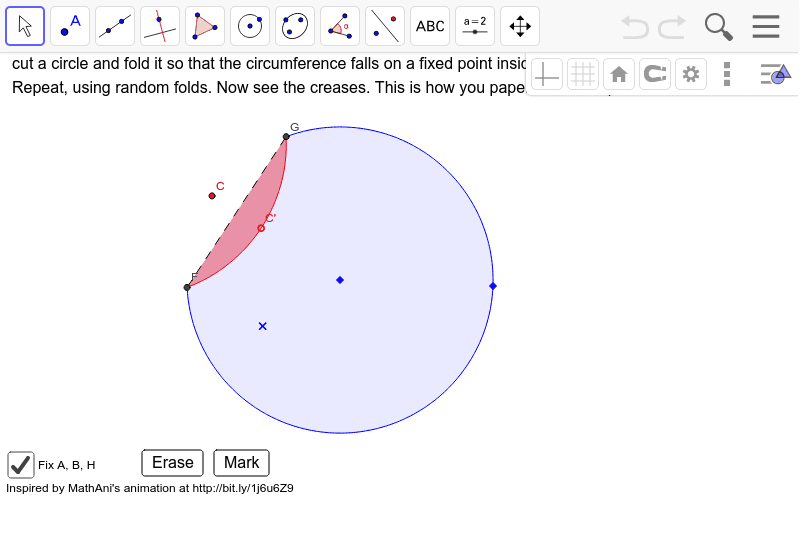
This example demonstrates the construction of an ellipse through paper folding, inspired by an animation from mathani. It involves core mathematical concepts such as the definition of an ellipse, axis symmetry, and geometric constructions. Key GeoGebra commands/objects used include Circle, Point, Segment, LineBisector, Intersect, Mirror, CircleArc, and PointIn. Suitable for high school mathematics teaching or exploration by math enthusiasts.
GeoGebra Commands & Parameters
Circle(A, B) → cPoint(c) → CSegment(C, D) → aPoint(a) → C'LineBisector(C', C) → bIntersect(c, b, 2) → FIntersect(c, b, 1) → GMirror(A, b) → A'CircleArc(A', F, G) → dPointIn(c) → HSegment(F, G) → fCircleArc(A, F, G) → e
AI Drawing Prompt Reference
Draw an ellipse constructed through paper folding, demonstrating the definition of an ellipse, axis symmetry, and geometric constructions. Start by drawing a circle, find a point on the circle and draw the perpendicular bisector of the line connecting this point to the center. Then find two intersection points on the circle, draw an arc connecting these points centered at the center, and finally reflect the center over the bisector to create a symmetric arc, forming the shape of the ellipse.
The prompt above was compiled from the original drawing commands and is for reference only.