
Find the Hypotenuse Using the Pythagorean Theorem
Loading the math board and drawing, please wait…
In collections
Satz des Pythagoras - Einführung
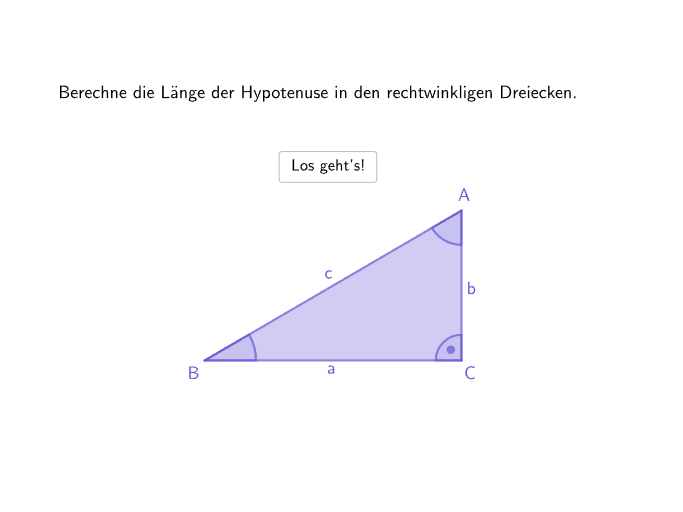
This GeoGebra activity lets students enter the two legs of a right triangle and then computes and checks the hypotenuse length, emphasizing practical calculation (with a calculator) and step-by-step validation. The central math concepts are the Pythagorean Theorem (a² + b² = c²), forming the correct equation for an unknown side length, and applying it within a planar right-triangle setting. Construction and interaction rely on GeoGebra commands/objects such as Sequence for generating random values and tracking attempts, Point and Polygon to build the right triangle, Angle to enforce the right-angle relationship, and Textfield with If to handle user input, validate it, and present feedback. It is well suited for grades 7–8 as guided practice for applying formulas in plane geometry.
GeoGebra Commands & Parameters
Sequence(Random[10, 1000] / 10, i, 1, 100) → randomNumbersA, {17.1, 19.1, 82.8, 11, 74.3, 20.9, 12.6, 32.6, 22.6, 14.4, 63.9, 30.7, 49.8, 96, 49, 3.6, 30.9, 75.3, 61.2, 50.8, 77.2, 25, 35, 16.8, 16, 72.4, 19.5, 29.4, 87.1, 55.2, 62.1, 1.5, 60.2, 74.7, 43, 68.6, 22.5, 15.9, 98, 93.6, 40.3, 99, 68.2, 87.9, 91.1, 55, 79.3, 12.1, 52.4, 90.5, 87, 20.3, 24.3, 27.1, 52.9, 73, 19.5, 63, 64.1, 78.2, 48.2, 22.6, 82.4, 1.5, 6.1, 47.3, 37.1, 21.3, 38.8, 2.7, 53.2, 17.3, 83.1, 33.6, 15.7, 3.9, 24.1, 73.6, 97.2, 65.9, 98.6, 7.4, 27, 26, 91.9, 29.8, 89.5, 52.5, 7.2, 3.6, 78.9, 13.6, 6.5, 15.3, 56.7, 28.2, 16.9, 69.3, 31.5, 29.3}Element(randomNumbersA, Mod[questionCount, Length[randomNumbersA]] + 1) → randomNumberASequence(Random[If[floor((randomNumbersA(i) * 0.3)) > 1, (floor((randomNumbersA(i) * 0.3)) * 10), 10], If[ceil((randomNumbersA(i) * 1.7)) < 100, (ceil((randomNumbersA(i) * 1.7)) * 10), 1000]] / 10, i, 1, 100) → randomNumbersB, {27.4, 14.4, 62.7, 11.2, 99.7, 27.9, 8.6, 13.6, 8.4, 15.8, 77.3, 36.1, 37.9, 65, 24.3, 5.7, 38, 54, 54.6, 25.9, 70.1, 8.3, 38.6, 26.2, 23.6, 33.4, 28.7, 19.9, 57, 54.4, 57.9, 1.7, 62.7, 80.1, 59.6, 77.2, 10, 25.6, 95.3, 86.2, 66.4, 66.4, 58, 39.4, 58.1, 73.7, 94.5, 19.6, 82.2, 95.9, 46.1, 22, 21.3, 21.8, 34.2, 43.6, 27.5, 66.1, 74.8, 79.7, 50.7, 35.6, 57.8, 2.2, 6.6, 37.2, 53.6, 13.5, 64.5, 1.8, 30.8, 15.2, 32.7, 50.3, 27, 6.6, 8.8, 98.8, 70.6, 66.5, 59.7, 6.8, 32.3, 34.8, 30.5, 43.8, 94, 81.4, 5.9, 3.4, 40, 21.8, 1.4, 21.6, 29.5, 41.8, 22.2, 49.5, 27.7, 20.8}Element(randomNumbersB, Mod[questionCount, Length[randomNumbersB]] + 1) → randomNumberBTextfield(input) → inputBoxIf(Length[Text[inputBox]] > 0, Length[KeepIf[¬(temp ∈ TextToUnicode[erlaubteZeichen]), temp, Take[TextToUnicode[Text[inputBox]], Min[Length[Text[inputBox]], 2]]]] ≟ 0, true) → inputValidPolygon(dreieckStartA, dreieckStartB, dreieckStartC) → dreieckStart, dreieckStartc, dreieckStarta, dreieckStartbAngle(dreieckStartA, dreieckStartC, dreieckStartB) → dreieckStartGammaAngle(dreieckStartB, dreieckStartA, dreieckStartC) → dreieckStartAlphaAngle(dreieckStartC, dreieckStartB, dreieckStartA) → dreieckStartBetaPoint(Circle[dreieckSolutionC, (randomNumberA * dreieckFactor)]) → dreieckSolutionAPolygon(dreieckSolutionC, dreieckSolutionA, dreieckSolutionB) → dreieck1, dreieckSolutionb, dreieckSolutionc, dreieckSolutionaAngle(dreieckSolutionB, dreieckSolutionA, dreieckSolutionC) → dreieckSolutionAlphaAngle(dreieckSolutionA, dreieckSolutionC, dreieckSolutionB) → dreieckSolutionGammaAngle(dreieckSolutionC, dreieckSolutionB, dreieckSolutionA) → dreieckSolutionBetaFlatten(Sequence[Shuffle[{"mm", "cm", "dm", "m"}], i, 1, 10]) → randomUnitsElement(randomUnits, Mod[questionCount, Length[randomUnits]] + 1) → randomUnit
AI Drawing Prompt Reference
Draw a right triangle with the lengths of the two legs being 17.1 and 27.4 units respectively. Use the Pythagorean theorem to calculate the length of the hypotenuse and enter the result in the input box. If the input is correct, show a correct message; otherwise, show an incorrect message.
The prompt above was compiled from the original drawing commands and is for reference only.