
Fermat Point in Right Triangles
Loading the math board and drawing, please wait…
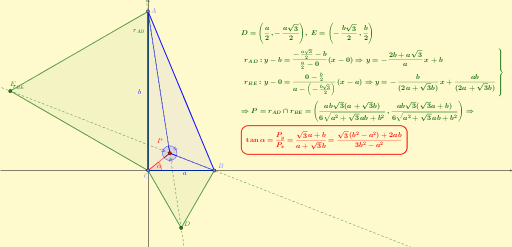
This example demonstrates the relationship between the Fermat point and the right angle vertex and one of the legs in a right triangle. Key concepts include the tangent function. Using GeoGebra commands such as Point, Polygon, Segment, Intersect, and Angle, the nature of the Fermat point can be visually understood. Suitable for high school mathematics education and learning.
GeoGebra Commands & Parameters
Point(yAxis) → CPoint(yAxis) → APolygon(A, C, B) → t1, b, a, cPolygon(B, C, 3) → polígono1, f, g, h, DSegment(A, D) → iSegment(C, A) → jPolygon(C, A, 3) → polígono2, k, l, m, ESegment(E, B) → nIntersect(i, n) → PSegment(C, P) → pAngle(B, C, P) → αAngle(B, P, A) → βAngle(C, P, B) → γAngle(A, P, C) → δSegment(A, P) → qSegment(P, B) → rSegment(E, P) → sSegment(P, D) → tLine(D, A) → r_{AD}Line(E, B) → r_{BE}
AI Drawing Prompt Reference
Draw a construction diagram involving right triangles and the Fermat point. Use two points on the coordinate axes as the right-angle vertex and one endpoint, then outline the related right triangle structure with polygonal sides. Create auxiliary points on the other relevant direction, draw segments connecting triangle endpoints to these auxiliary points, and find their intersection to locate the Fermat-point position. From this intersection, draw segments to the right-angle vertex and to the other triangle endpoint, and mark several angles at the intersection defined by pairs of rays through the corresponding vertices. Keep the corresponding lines extended through the original endpoint and auxiliary-point directions to visually support the angle relationships.
The prompt above was compiled from the original drawing commands and is for reference only.