
Extrusion Transformation Demo
Loading the math board and drawing, please wait…
In collections
surface 3D
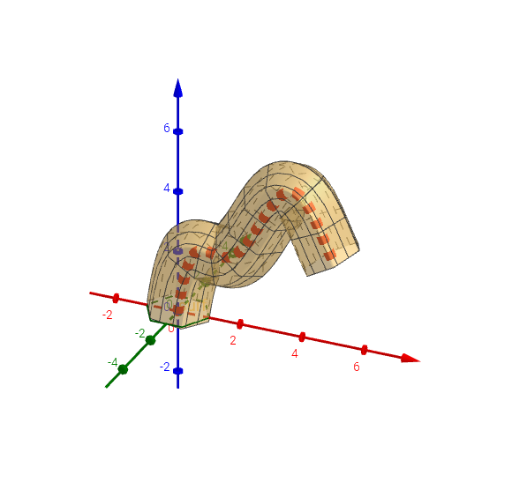
This example demonstrates the extrusion transformation in 3D space, generating a rotational surface by extruding a function graph. It involves core mathematical concepts such as linear functions, limits, geometric transformations, rotation, function graph fitting, and derivatives. The construction leverages commands like Function, CurveCartesian, Intersect, FitPoly, Derivative, Surface, along with objects like n, fx, fy, curv, A-F, f, f', surf, c3d, and op. It is suitable for high school and above, combining function transformations, calculus, and solid geometry for comprehensive learning.
GeoGebra Commands & Parameters
Function(Join[{{0, (2 * π)}, Sequence[cos(i), i, 0, (2 * π), (2 * π / n)]}]) → fxFunction(Join[{{0, (2 * π)}, Sequence[sin(i), i, 0, (2 * π), (2 * π / n)]}]) → fyCurveCartesian(fx(t), fy(t), t, 0, (2 * π)) → curvIntersect(xAxis, yAxis) → AFitPoly({A, B, C, D, E, F}, 5) → fDerivative(f) → f'Surface(v + (fx(u) * cos(π / 2 + atan(f'(v)))), fy(u), f(v) + (fx(u) * sin(π / 2 + atan(f'(v)))), u, 0, (2 * π), v, 0, x(F)) → surfCurveCartesian(t, 0, f(t), t, 0, x(F)) → c3d
AI Drawing Prompt Reference
In 3D space, first construct a closed planar curve defined by parametric equations, sampling sine and cosine functions uniformly around a circle. Place a reference point at the origin, then fit a fifth-degree polynomial curve through this point and five other points, and compute its derivative. Next, use this polynomial as a spine and sweep the closed curve along its normal direction to generate a rotational surface, which appears as a tubular or flared shape wrapping around the spine. Finally, project the polynomial and its derivative onto a plane to visualize the relationship between the function and its slope.
The prompt above was compiled from the original drawing commands and is for reference only.