
Exploring Symmetry in Nature with GeoGebra
Loading the math board and drawing, please wait…
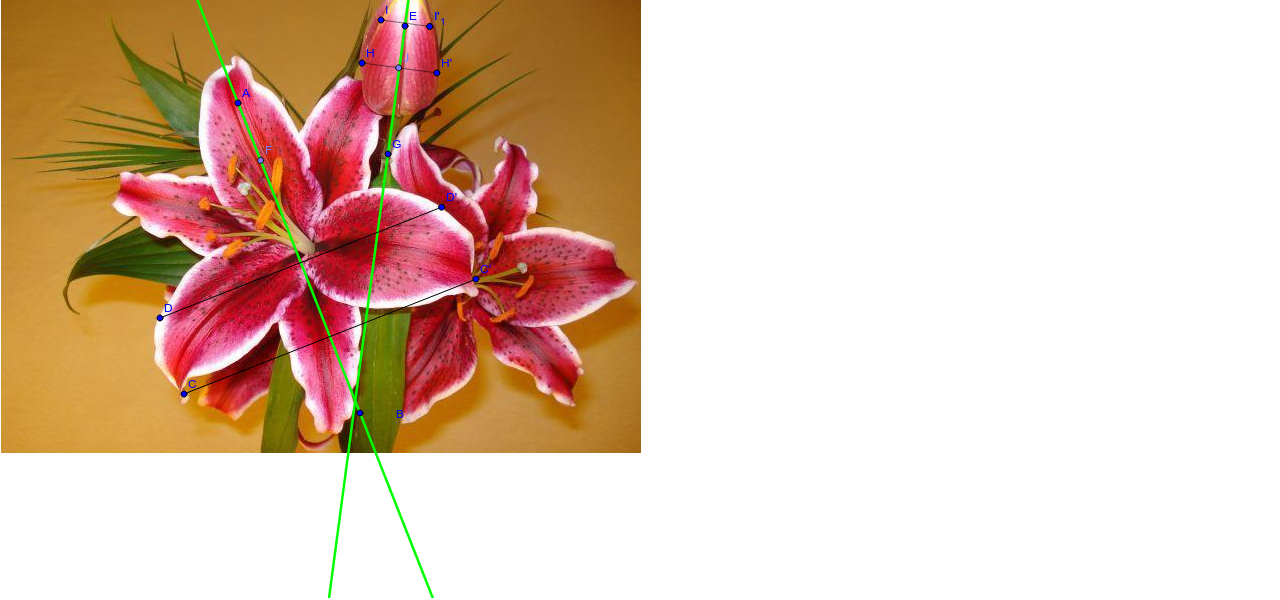
① This example demonstrates symmetry phenomena found in nature using GeoGebra, constructing mirrored figures to visually show the correspondence across an axis of symmetry. ② Core mathematical concepts include axial symmetry, reflection transformations, symmetric properties of points and line segments, and how quadratic and linear function graphs behave under reflection. ③ Construction highlights: the Line command creates the symmetry axis, Mirror reflects points, segments, and the image (pic1), Segment constructs symmetric segments, and Point marks key points (A, B, C, D, etc.) and their images (C', D', H', I'), while function objects (a, b, c) illustrate symmetric graphs. ④ Suitable for middle and high school students learning symmetry transformations, function graph symmetry, and geometric construction, as well as for interdisciplinary lessons connecting mathematics to natural aesthetics.
GeoGebra Commands & Parameters
Line(A, B) → aMirror(C, a) → C'Mirror(D, a) → D'Segment(D, D') → bSegment(C, C') → cPoint(a) → FLine(E, G) → dMirror(H, d) → H'Mirror(I, d) → I'Mirror(I, d) → I'_1Segment(H, H') → eSegment(I, I') → fPoint(e) → JPoint(a) → K
AI Drawing Prompt Reference
Draw a vertical symmetry axis as a straight line. Place two points on one side and reflect them across this axis to create their mirror images, then connect each original point to its image with a segment. Next, draw a second slanted symmetry axis. Reflect two other points across this new axis to form their images, and connect these pairs with segments. Mark one point on each symmetry axis and one point on one of the constructed segments. The final figure shows mirrored point pairs, connecting segments, and two axes, illustrating natural symmetry.
The prompt above was compiled from the original drawing commands and is for reference only.