
Exploring Ordinary Differential Equations
Loading the math board and drawing, please wait…
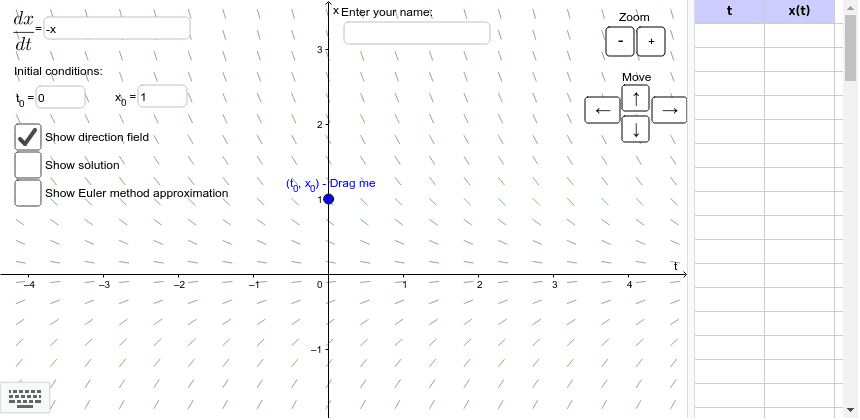
This applet displays the solution and direction field of an ordinary differential equation and computes an approximate solution using Euler's method. It involves core mathematical concepts such as ordinary differential equations and functions. By using the SolveODE command, users can observe how solutions change with different initial conditions. Suitable for calculus and ordinary differential equations courses.
GeoGebra Commands & Parameters
Textfield(f) → dxdtInputTextfield(ICt) → tInputTextfield(ICx) → xInputTextfield(h) → hInputSequence((Object["A" + (n)], Object["B" + (n)]), n, 0, nMax) → eulerPointsPolyLine(eulerPoints) → EulerCurveTextfield() → nameInputSolveODE(f(y, x), x(ICPoint), y(ICPoint), x(Corner[2]), 0.001) → solnForwardsSolveODE(f(y, x), x(ICPoint), y(ICPoint), x(Corner[1]), 0.001) → solnBackwardsSequence(Segment[(x(Corner[1]) + (viewWidth / dirFieldX * (Mod[i, dirFieldX] + 0.5)), y(Corner[1]) + (viewHeight / dirFieldY * (Div[i, dirFieldX] + 0.5))), (x(Corner[1]) + (viewWidth / dirFieldX * (Mod[i, dirFieldX] + 0.5)) + (arrowLength * cos(atan(f(y(Corner[1]) + (viewHeight / dirFieldY * (Div[i, dirFieldX] + 0.5)), x(Corner[1]) + (viewWidth / dirFieldX * (Mod[i, dirFieldX] + 0.5)))))), y(Corner[1]) + (viewHeight / dirFieldY * (Div[i, dirFieldX] + 0.5)) + (arrowLength * sin(atan(f(y(Corner[1]) + (viewHeight / dirFieldY * (Div[i, dirFieldX] + 0.5)), x(Corner[1]) + (viewWidth / dirFieldX * (Mod[i, dirFieldX] + 0.5)))))))], i, 0, (dirFieldX * dirFieldY) - 1) → dirField
AI Drawing Prompt Reference
Draw the solution and direction field of an ordinary differential equation. First, input the differential equation dx/dt=f(x,t). Then, input the initial conditions for t and x. Use Euler's method to draw the approximate solution curve. Finally, display the forward and backward solutions starting from the initial point and draw direction field arrows within the plotting area.
The prompt above was compiled from the original drawing commands and is for reference only.