
Explaining Steps for Rewriting Equations: IM Alg1.2.7 Practice
Loading the math board and drawing, please wait…
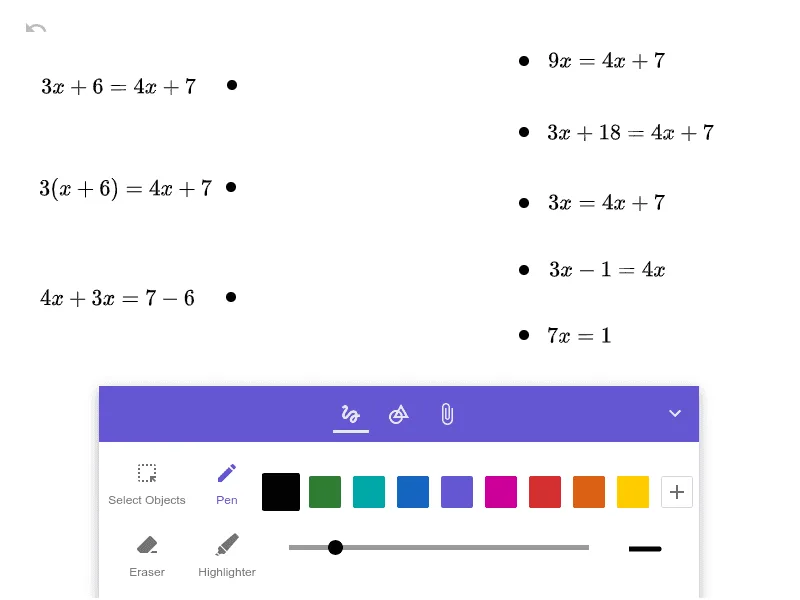
This GeoGebra example illustrates how to explain the steps involved in rewriting algebraic equations, focusing on the logical justification behind each transformation. It demonstrates the process of solving linear equations by applying properties of equality, combining like terms, and isolating variables. The construction uses multiple named objects (e.g., Strich2, Strich5, etc.) and image objects (Bild1 to Bild8), likely serving as visual annotations, arrows, or snapshots to highlight intermediate steps in the equation rewriting process. This resource is suitable for middle or high school algebra students, particularly for classroom practice or self-study, aiming to deepen conceptual understanding of equation manipulation rather than rote memorization.
GeoGebra Commands & Parameters
PolyLine[(2.0819397993311046,-0.599598662207358), (2.0819397993311046,-0.599598662207358), (NaN,NaN), true]PolyLine[(2.0819397993311046,3.9640133779264235), (2.0819397993311046,3.9640133779264235), (NaN,NaN), true]PolyLine[(2.081939799331104,0.48301003344481624), (2.081939799331104,0.48301003344481624), (NaN,NaN), true]PolyLine[(2.0819397993311046,2.7814715719063554), (2.0819397993311046,2.7814715719063554), (NaN,NaN), true]PolyLine[(-2.798127090301004,0.0333110367892977), (-2.798127090301004,0.0333110367892977), (NaN,NaN), true]PolyLine[(-2.798127090301004,1.8654180602006696), (-2.798127090301004,1.8654180602006696), (NaN,NaN), true]PolyLine[(-2.781471571906356,3.5642809364548507), (-2.781471571906356,3.5642809364548507), (NaN,NaN), true]PolyLine[(2.081939799331104,1.598929765886288), (2.081939799331104,1.598929765886288), (NaN,NaN), true]
AI Drawing Prompt Reference
Draw a set of axis-aligned line segments (horizontal/vertical) in one coordinate plane, styled as connected polylines with arrow-like markers. Use the main vertical segment at x≈2.08194 spanning from y≈−0.59960 to y≈3.96401. Add several shorter vertical segments at the same x≈2.08194 with endpoints near y≈0.48301, y≈2.78147, and y≈1.59893. On the left side, place matching short vertical segments at x≈−2.79813 with endpoints near y≈0.03331 and y≈1.86542, and one more short segment at x≈−2.78147 with endpoint near y≈3.56428. Arrange them as separate connected polylines with visible gaps at the NaN breaks.
The prompt above was compiled from the original drawing commands and is for reference only.