
Example of Reading Sine and Cosine from Unit Circle
Loading the math board and drawing, please wait…
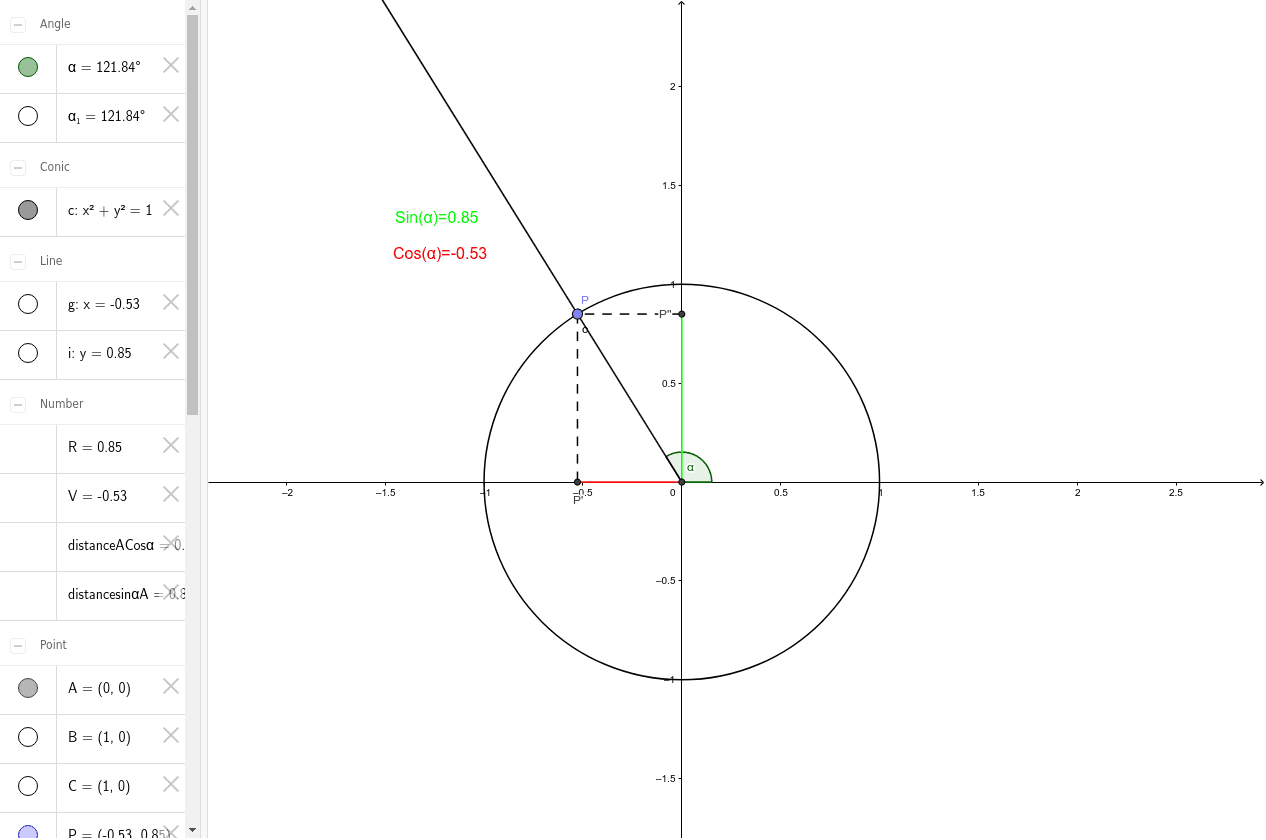
This example demonstrates reading sine and cosine from the unit circle. Core mathematical concepts include trigonometric functions. Construction highlights the use of intersection, point, circle, ray, angle, line, segment, and distance commands in GeoGebra. Suitable for students from middle school and above learning trigonometry.
GeoGebra Commands & Parameters
Intersect(xAxis, yAxis) → APoint(xAxis) → BCircle(A, B) → cPoint(c) → PRay(A, P) → fAngle(xAxis, f) → α_1Line(P, yAxis) → gIntersect(g, xAxis) → P'Segment(P, P') → hLine(P, xAxis) → iIntersect(i, yAxis) → P''Segment(P'', P) → jDistance(P'', A) → distancesinαADistance(A, P') → distanceACosαSegment(A, P') → kSegment(P'', A) → lIntersect(c, xAxis, 1) → CSegment(A, C) → mAngle(m, f) → α
AI Drawing Prompt Reference
Draw a unit circle with the origin on the x-axis and y-axis. From the origin, draw a ray to any point on the circle and measure the angle between the ray and the x-axis. Draw a line perpendicular to the x-axis from the point on the circle, meeting the x-axis at another point. Connect the origin to this point and measure the length as sine. Connect the center of the circle to this point and measure the length as cosine. Finally, draw a line from the origin to the point on the circle and measure the angle between this line and the ray.
The prompt above was compiled from the original drawing commands and is for reference only.