
Equilateral Triangles Inscribed in a Cosine Curve
Loading the math board and drawing, please wait…
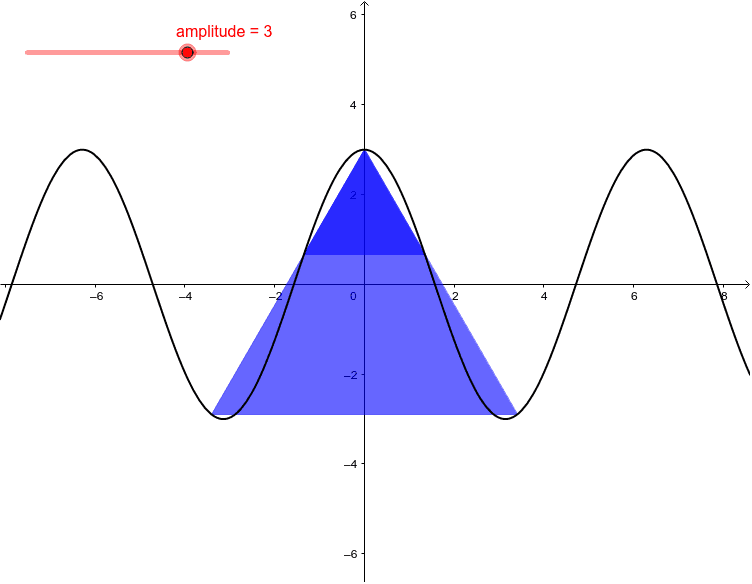
This example explores the possibility of selecting points on the graph of y = A cos x to form the vertices of an equilateral triangle. It involves core mathematical concepts such as trigonometric functions, coordinate geometry, and geometric construction. The construction utilizes GeoGebra commands like Roots and If, along with objects like amplitude, g, f, A, B, C, D, poly1, and poly2. It is suitable for high school and above students to investigate the intersection of function graphs and geometric shapes, fostering spatial visualization and logical reasoning skills.
GeoGebra Commands & Parameters
Roots(f, -6.283185307179586, 6.283185307179586) → A, B, C, DIf(Defined[D], Polygon[(0, amplitude), (x(A), g(x(A))), (x(D), g(x(D)))]) → poly1If(Defined[D], Polygon[(0, amplitude), (x(B), g(x(B))), (x(C), g(x(C)))]) → poly2
AI Drawing Prompt Reference
Draw equilateral triangles on a cosine curve by identifying the roots of the cosine function within a specified range as vertices, then connect these points to form two equilateral triangles, one with the origin as a vertex and the other using the vertices of the first triangle, illustrating the intersection of the function graph with geometric shapes.
The prompt above was compiled from the original drawing commands and is for reference only.