
Ellipse of Inertia
Loading the math board and drawing, please wait…
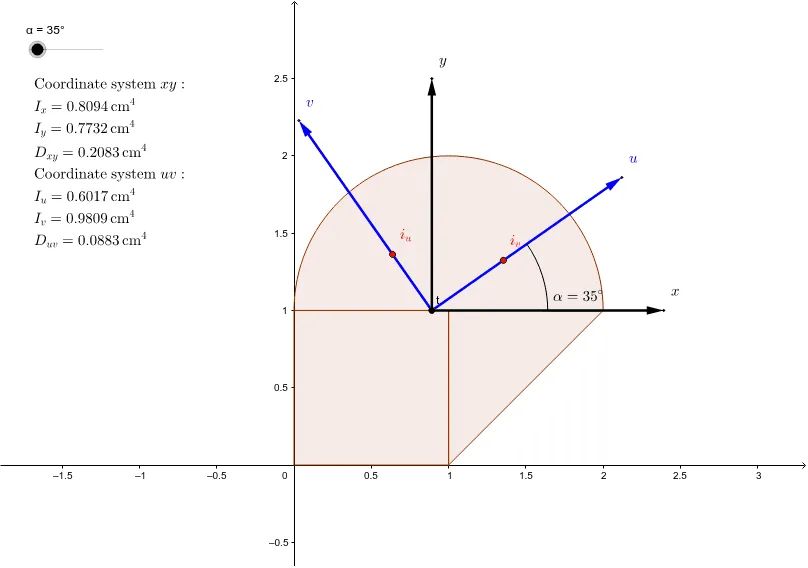
This example demonstrates the concept of the ellipse of inertia, showing how the geometric representation of rotational inertia is transformed. It uses commands like Polygon, Vector, and CircleArc to construct the ellipse. Suitable for high school physics and mathematics education, helping students understand the geometric meaning of rotational inertia.
GeoGebra Commands & Parameters
Polygon(O, B, C, D) → poly1, a, b, c, dPolygon(B, C, E) → poly2, e, b_1, c_1CircleSector(C, E, D) → fVector(t, BX) → osaXVector(t, BY) → osaYVector(t, BXa) → osaUVector(t, BYa) → osaVMidpoint(t, BX) → B1aMidpoint(t, BXa) → B2aCircleArc(t, B1a, B2a) → g
AI Drawing Prompt Reference
Draw a diagram illustrating the ellipse of inertia. Start by constructing a quadrilateral with one vertex at the origin, then add a triangle sharing a side with the quadrilateral. Connect a vertex of the triangle to an opposite vertex of the quadrilateral with a circular arc, forming a sector. From the origin, draw two vectors along the coordinate axes to represent principal axes, and two additional vectors rotated at an angle to represent transformed axes. Mark midpoints on the two coordinate-axis vectors, and draw a circular arc between these midpoints, which together with the sector suggests the elliptical shape.
The prompt above was compiled from the original drawing commands and is for reference only.