
Dynamic Pythagorean Theorem Exploration
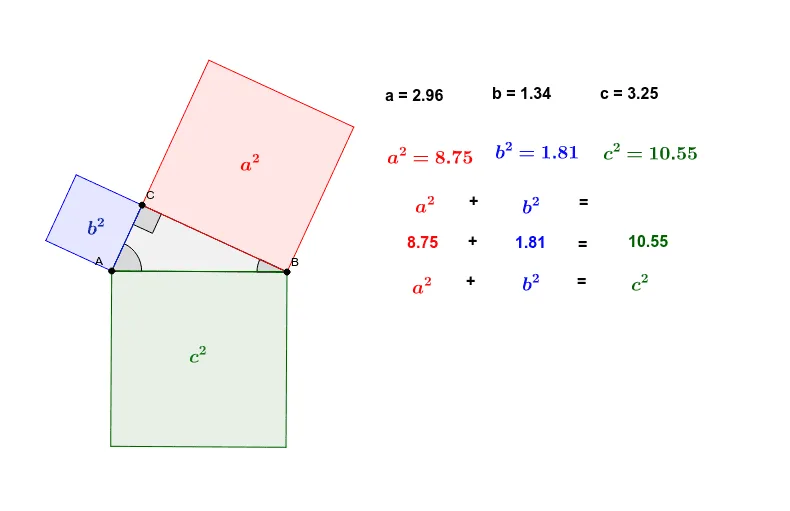
Loading the math board and drawing, please wait…
This example demonstrates the Pythagorean theorem through dynamic geometry construction, focusing on right triangles and their side relationships. Key math concepts include the Pythagorean theorem, right triangles, and dynamic geometry. It uses commands like Segment, Semicircle, Point, Polygon, Angle, OrthogonalLine, Circle, Intersect, Line, and Midpoint. Suitable for middle school students and above to explore and understand the theorem's proof and applications.
GeoGebra Commands & Parameters
Segment(A, B) → a_2Semicircle(A, B) → c_2Point(c_2) → CPolygon(A, B, C) → poly1, c, a, bAngle(B, A, C) → αAngle(C, B, A) → βAngle(A, C, B) → γOrthogonalLine(C, a) → dOrthogonalLine(B, a) → eCircle(C, B) → fIntersect(f, d, 1) → DLine(D, a) → gIntersect(e, g) → EPolygon(C, B, E, D) → poly2, c_1, b_1, e_1, d_1OrthogonalLine(C, b) → hOrthogonalLine(A, b) → iCircle(C, A) → kIntersect(k, h, 1) → FLine(F, b) → jIntersect(i, j) → GPolygon(A, C, F, G) → poly3, a_1, c_3, f_1, g_1OrthogonalLine(A, c) → lOrthogonalLine(B, c) → mCircle(A, B) → pIntersect(p, l, 1) → HLine(H, c) → nIntersect(m, n) → IPolygon(A, B, I, H) → poly4, a_3, b_2, i_1, h_1Midpoint(G, C) → JMidpoint(D, B) → KMidpoint(B, H) → L
AI Drawing Prompt Reference
Draw a right triangle with labeled sides, create a semicircle on the hypotenuse, and mark a point on the semicircle. Connect this point to the triangle's vertices to form two smaller triangles. Draw circles with diameters equal to the smaller triangles' hypotenuses, intersecting perpendicular lines to reveal geometric relationships demonstrating the Pythagorean theorem.
The prompt above was compiled from the original drawing commands and is for reference only.