
Dynamic Geometry Animation: Composite Transformations of Lines, Circles, and Sec
Loading the math board and drawing, please wait…
In collections
Angle Congruence Intros
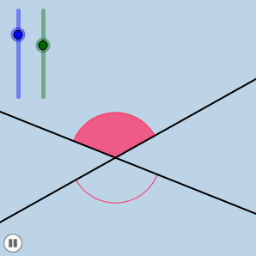
① This example demonstrates a dynamic geometric animation composed of points, lines, circles, and sectors, showing the relationships and motion among geometric elements through rotations, translations, and scaling. ② Core mathematical concepts include linear functions, straight lines, angle rotation, circle properties, sector area, and introductory fractal geometry, involving transformations (rotation, translation, dilation) and locus generation. ③ Construction highlights: Based on the construction summary, the example uses GeoGebra commands such as Point, Rotate, Angle, Line, Circle, Intersect, CircleSector, Dilate, Vector, Translate, and CircleArc, creating numerous objects like m, A, a, B, α, B', β, b, c, e, d, C, f, D, E, F, G, H, I, J, K, g, h, s, t, i, A', u, j, s', t', l, d_1, e_1, g_1, k_1, t'', s''. Parameters are controlled via sliders or animation. ④ Suitable for high school or early college students to understand geometric transformations, function graphs, and dynamic geometry, also serving as an intuitive introduction to fractal geometry, enhancing spatial visualization and dynamic thinking.
GeoGebra Commands & Parameters
Point(a) → BRotate(B, α, A) → B'Angle(B, A, B') → βLine(A, B') → bCircle(A, 1) → eIntersect(b, d) → CCircle(C, 1) → fIntersect(e, a) → D, EIntersect(e, b) → F, GIntersect(f, b) → H, IIntersect(f, d) → J, KCircleSector(C, K, I) → gCircleSector(C, I, J) → hCircleSector(A, D, F) → sCircleSector(A, F, E) → tDilate(A, If[0 < i < 1, 1 - i], C) → A'Vector(A, A') → uTranslate(s, u) → s'Translate(t, u) → t'CircleArc(C, K, I) → d_1CircleArc(C, I, J) → e_1CircleArc(A, D, F) → g_1CircleArc(A, F, E) → k_1Rotate(t', ((i * 180))°, A') → t''Rotate(s', If[0 < i ≤ 1, (i * π), π], A') → s''
AI Drawing Prompt Reference
Create a dynamic geometric animation showing points, lines, circles, and sectors moving through rotations, translations, and scaling. Include linear functions, straight lines, angle rotations, circle properties, and sector areas. Start by placing a point and drawing a line, then rotate the point around the origin to create a new point and line. Draw two circles and find their intersections, then use these points to create new circles and sectors. Use sliders to control parameters and demonstrate the dynamic changes and fractal patterns.
The prompt above was compiled from the original drawing commands and is for reference only.