
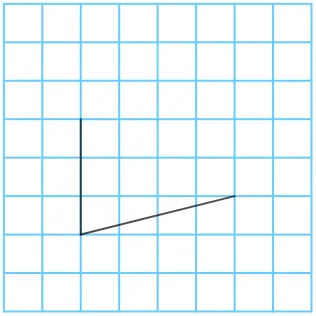
Drawing a Parallelogram: Problem 2
This GeoGebra applet demonstrates how to construct a parallelogram through geometric construction and rotation transformations. The interactive visualization guides students through a step-by-step process of building a parallelogram from scratch using fundamental geometric tools. Users can interact with points, segments, angles, rotation commands, and polygon construction to observe how each element contributes to the final figure. The applet leverages dynamic coordinates and sequence features to animate the construction process, allowing learners to see how a parallelogram emerges when one segment is rotated by a specific angle around a chosen point. By adjusting parameters such as side lengths and rotation angles in real time, students can explore how these changes affect the shape while preserving the defining properties of a parallelogram: opposite sides that are equal in length and parallel to each other, and opposite angles that are equal. The interactive nature of the applet supports active learning, enabling students to experiment with different configurations and discover geometric relationships on their own. This makes it an excellent resource for plane geometry education, suitable for classroom instruction, self-paced exploration, or homework assignments. The applet reinforces key concepts including point placement, segment construction, angle measurement, rotational symmetry, and the properties that uniquely define a parallelogram, providing a visual and hands-on approach to understanding these abstract geometric ideas.
In collections
Drawing Parallelograms
Loading the math board and drawing, please wait…