
Dot Disk 19
Loading the math board and drawing, please wait…
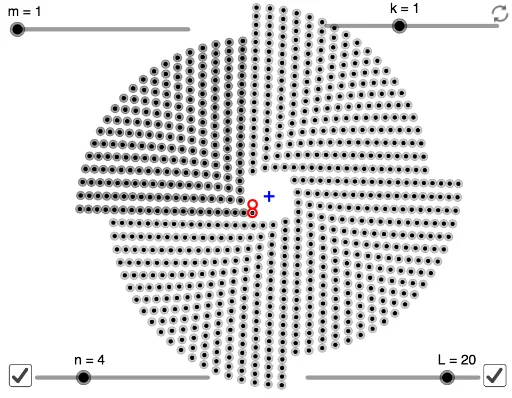
This example demonstrates mathematical art and visual patterns. It showcases the beauty of dot arrays through point arrangement and transformation. Key mathematical concepts include dot arrays, sequences, and transformations. The Sequence command is used to generate the dot array, and objects n, m, k, etc., are used to define point positions. Suitable for middle school and above, as a teaching tool for mathematical art or geometric construction.
GeoGebra Commands & Parameters
Sequence(Rotate[Sequence[Sequence[Rotate[B + (j * (B - A)), (i * α / (m + (j * k))), A], i, 1, m + (j * k)], j, 0, L - 1], (l * α), C], l, 0, n) → l1
AI Drawing Prompt Reference
Create a dot array artwork with a spiral pattern. Start with two base points, use one as a pivot to rotate the other around it, generating a radial sequence of dots. Then rotate this entire sequence around the first base point by increasing angles, repeating for several layers while varying the number of dots per layer. The result is a multi-layered, spiraling dot matrix with symmetric, rhythmic visual appeal, ideal for mathematical art.
The prompt above was compiled from the original drawing commands and is for reference only.