
Division of Powers
Loading the math board and drawing, please wait…
In collections
Rechnen mit Potenzen
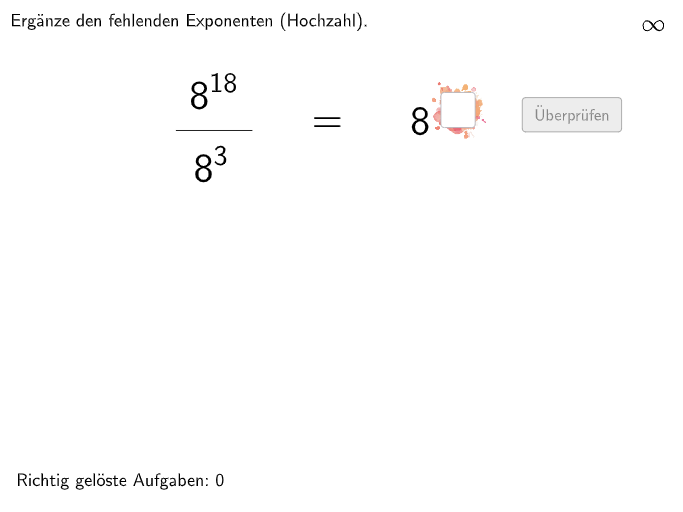
This example demonstrates how to perform division of powers, showing the relationship between fractions and exponents. The core mathematical concepts involved include the definition of exponents, rules of exponent operations, and the relationship between fractions and exponents. The construction points include using GeoGebra's Textfield, Shuffle, If, Join, Polygon, and other commands and objects. Suitable for middle school mathematics education, particularly for students in grades 7-8.
GeoGebra Commands & Parameters
Textfield(input1) → InputBox1Textfield(input2) → InputBox2Shuffle({1, 2, 3}) → ModusList, {2, 3, 1}If(questionCount ≥ 4, 4, questionCount) → metaprogressionJoin({{1}, ModusList}) → ModusMioPlaylistShuffle(Sequence[i, i, 1, 19]) → AStartList, {15, 19, 5, 14, 2, 17, 10, 11, 6, 4, 12, 7, 9, 1, 3, 8, 13, 18, 16}Shuffle(Sequence[i, i, 1, 19]) → BStartList, {3, 1, 9, 18, 19, 6, 10, 2, 15, 14, 5, 11, 8, 17, 7, 12, 13, 16, 4}Shuffle(Sequence[i, i, 1, 9]) → AMidList, {7, 6, 9, 8, 5, 3, 2, 1, 4}Shuffle(Sequence[i, i, 1, 9]) → BMidList, {1, 5, 7, 9, 2, 6, 4, 8, 3}Polygon(PtopLeftCornerFeedback, PtopRightCornerFeedback, PbottomRightCornerFeedback, PbottomLeftCornerFeedback) → rectangleCorrect, rectangleCorrectS3, rectangleCorrectS4, rectangleCorrectS2, rectangleCorrectS1Shuffle(Sequence[Random[0, 10], i, 1, 100]) → randomNosForX, {1, 8, 6, 8, 1, 10, 5, 7, 3, 7, 0, 0, 4, 4, 5, 2, 6, 10, 4, 5, 3, 0, 4, 9, 1, 0, 6, 9, 4, 9, 9, 6, 6, 8, 7, 6, 9, 5, 1, 6, 4, 4, 3, 9, 0, 5, 6, 5, 0, 1, 3, 5, 1, 1, 6, 8, 1, 5, 9, 1, 7, 3, 9, 0, 9, 6, 3, 7, 8, 10, 2, 5, 0, 8, 7, 2, 8, 0, 5, 3, 5, 1, 4, 1, 5, 2, 10, 8, 0, 0, 7, 0, 10, 0, 8, 2, 4, 0, 2, 3}Element(randomNosForX, Mod[questionCount, 100] + 1) → numXShuffle(Sequence[Random[0, 10], i, 1, 100]) → randomNosForY, {0, 5, 3, 9, 1, 5, 6, 8, 0, 7, 3, 2, 7, 7, 1, 9, 7, 6, 4, 9, 7, 6, 6, 2, 8, 7, 1, 8, 3, 8, 9, 0, 6, 7, 3, 3, 5, 5, 9, 8, 4, 7, 1, 2, 7, 10, 4, 6, 6, 1, 0, 9, 1, 4, 8, 4, 4, 7, 10, 10, 1, 9, 0, 3, 4, 7, 8, 10, 4, 6, 2, 2, 10, 1, 1, 9, 2, 2, 1, 7, 4, 0, 3, 3, 8, 3, 8, 0, 2, 8, 10, 0, 8, 2, 10, 7, 3, 0, 0, 3}Element(randomNosForY, Mod[questionCount, 100] + 1) → numYAppend(true, Sequence[If[randomNosForX(i) ≟ randomNosForX(i - 1), false, true], i, 2, 100]) → stayXAppend(true, Sequence[If[randomNosForY(i) ≟ randomNosForY(i - 1), false, true], i, 2, 100]) → stayYRemove(Sequence[If[stayX(i), randomNosForX(i), 0], i, 1, 100], Sequence[0, i, 1, 100]) → randomNosForXwithoutRepeatRemove(Sequence[If[stayY(i), randomNosForY(i), 0], i, 1, 100], Sequence[0, i, 1, 100]) → randomNosForYwithoutRepeatElement(randomNosForXwithoutRepeat, Mod[questionCount, Length[randomNosForXwithoutRepeat]] + 1) → numXwithoutRepeatElement(randomNosForYwithoutRepeat, Mod[questionCount, Length[randomNosForYwithoutRepeat]] + 1) → numYwithoutRepeatShuffle(Sequence[i, i, -10, 10] \ {0}) → XGanzzhahlList, {6, -2, -3, 1, 4, 8, 3, 10, -10, 2, 9, -1, -6, -8, -4, 5, 7, -7, -9, -5}Shuffle(Sequence[i, i, 1, 10]) → XStartList, {8, 9, 4, 2, 10, 1, 5, 7, 3, 6}Shuffle(Join[{XDezizahlList, XGanzzhahlList}]) → XMidList, {-9, 1, -0.4, -0.8, 3, 5, 3.5, -1.5, 2, 1.1, 3.8, 0.4, 0.7, 0.9, 1.8, 1.2, 10, 4.6, -2, 0.6, 8, -1.3, 0.3, -7, 2.5, 3.6, 4.1, 4, -4, 2.4, 0.2, 2.9, 4.3, -0.1, 2.8, -1.9, 4.5, -0.3, -0.5, -6, 3.3, 3.9, -1.2, 4.4, 1.6, -5, -0.7, 0.1, -0.9, 3.2, -3, 4.8, -8, 1.3, 5, -1.1, 4.9, 4, -1.7, 0.5, 4.7, 1.4, -0.6, 1.5, 3.7, 3, -1.6, 1.7, 2.3, -1, 2.1, -1.8, -0.2, -2, 9, 6, 4.2, -10, 2, -1.4, 3.1, 2.6, 0.8, 7, 2.2, 3.4, -1, 1.9, 2.7, 1}Text(Text2, E, false, true, -1, 0) → Text6Text(Text3, F, false, true, -1, 0) → Text7Midpoint(Corner[Text6, 1], Corner[Text6, 4]) → Pos1Midpoint(Corner[Text7, 1], Corner[Text7, 3]) → Pos2Textfield(input3) → InputBox3Text(Text4, B, false, true, -1, 0) → Text10Midpoint(Corner[Text10, 1], Corner[Text10, 3]) → Pos3If(modus ≟ 1, Defined[input1], modus ≟ 2, Defined[input2], Defined[input3]) → fixedMidpoint(Corner[Text12, 1], Corner[Text12, 3]) → Pos4Text(Text12, A, false, true, -1, 0) → Text5
AI Drawing Prompt Reference
Create a visual representation of power division, featuring two input boxes for numerical values, with randomly generated sequences and coordinate points forming geometric shapes to illustrate the relationship between fractions and exponents, and geometrically depict the calculation results, showing the rules of exponent operations in a step-by-step manner from input to output.
The prompt above was compiled from the original drawing commands and is for reference only.