
Dividing Mixed Numbers Interactive Demo (Bilingual)
Loading the math board and drawing, please wait…
In collections
Fractions الكسور
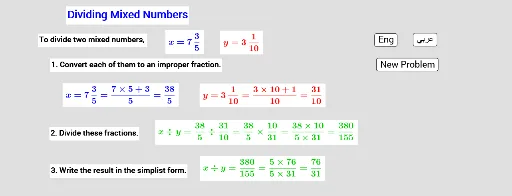
This GeoGebra example demonstrates the step-by-step process of dividing mixed numbers (also called mixed fractions). It randomly generates division problems and visually breaks down each step: converting mixed numbers to improper fractions, performing the division, and simplifying the result using the greatest common divisor (GCD). The core mathematical concepts include operations with mixed numbers, conversion between mixed and improper fractions, and fraction simplification. The construction uses the Random command to generate numerators and denominators, the GCD command to find common divisors for simplification, and multiple text objects (text1 through text11) to display each calculation stage. Buttons (button1, button2, button3) allow switching between English and Arabic interfaces or generating new problems. This resource is suitable for upper elementary and middle school students learning fraction division, as well as for teachers demonstrating the algorithm in class.
GeoGebra Commands & Parameters
Random(3, 7) → aRandom(2, 10) → cRandom(1, 3) → a'Random(1, c) → bRandom(2, 10) → c'Random(1, Min[b, c']) → b'Random(1, 5) → a_1Random(2, 10) → c_2Random(1, c_2) → b_1GCD((m * n'), (n * m')) → dRandom(1, 5) → a_2Random(2, 10) → c_1Random(1, c_1) → b_2Random(1, 5) → a'_1Random(2, 10) → c'_1Random(1, c'_1) → b'_1
AI Drawing Prompt Reference
Create an interactive educational diagram demonstrating step-by-step division of mixed numbers. The figure shows a randomly generated division problem with mixed fractions, and each calculation stage is displayed in labeled text boxes: converting mixed numbers to improper fractions, performing the division, and simplifying the result using the greatest common divisor. Three buttons allow switching between English and Chinese interfaces or generating a new problem. The layout is clean, suitable for classroom demonstration, with text boxes arranged in calculation order, highlighting fraction conversion and simplification steps.
The prompt above was compiled from the original drawing commands and is for reference only.