
Dilations Exploration by Allison Sutton
Loading the math board and drawing, please wait…
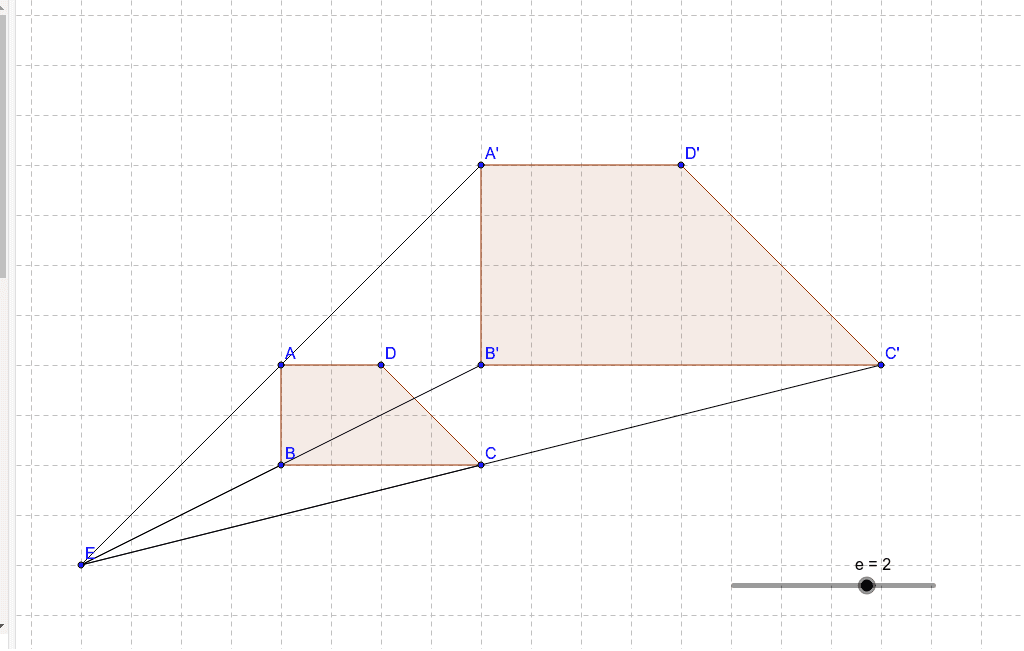
This example demonstrates the transformation of shapes under dilation, focusing on scaling effects. Key math concepts include dilation, scale factor, polygons, and coordinate geometry. It uses commands like Point, Polygon, Dilate, and Segment. Suitable for high school students learning geometric transformations and coordinate geometry.
GeoGebra Commands & Parameters
Point(Circle[A, 2]) → BPolygon(A, B, C, D) → poly1, a, b, c, dDilate(A, e, E) → A'Dilate(B, e, E) → B'Dilate(C, e, E) → C'Dilate(D, e, E) → D'Polygon(A', B', C', D') → poly1', a', b', c', d'Segment(A, E) → fSegment(A', E) → gSegment(B, E) → hSegment(B', E) → iSegment(C, E) → jSegment(C', E) → k
AI Drawing Prompt Reference
Draw a circle with center A and radius 2, then pick four points A, B, C, D on the circle and connect them to form a quadrilateral. Then dilate the quadrilateral with center E and scale factor e to get a new quadrilateral A'B'C'D'. Finally, draw lines from points A, B, C to point E and their corresponding lines in the dilated quadrilateral.
The prompt above was compiled from the original drawing commands and is for reference only.