
Difference of Squares Geometrically
Loading the math board and drawing, please wait…
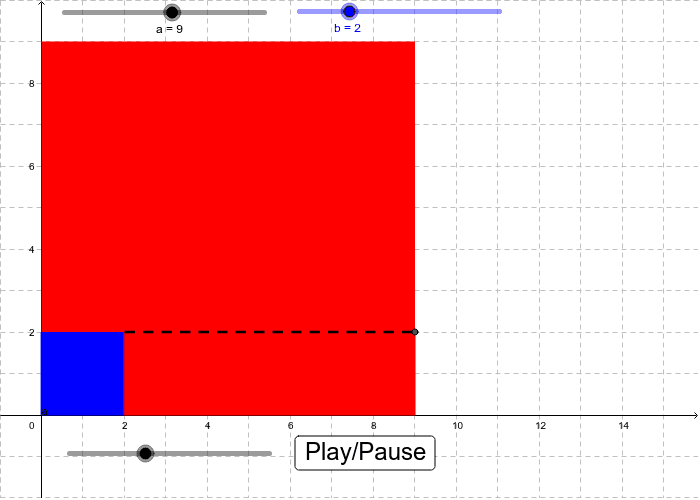
This example uses snap cube models to demonstrate the concept of the difference of squares. It involves key mathematical concepts such as squares, geometric construction, and transformation. Using GeoGebra commands like If, Polygon, Rotate, Segment, RotateText, the geometric meaning of the difference of squares is dynamically illustrated. Suitable for middle school and above students to learn the formula and geometric interpretation of the difference of squares.
GeoGebra Commands & Parameters
If((a + b + 1) / aspect > a + 3, a + b + 1, ((a + 3) * aspect) - 1) → xmaxPolygon(A, A + (a, 0), 4) → poly1, c, d, e, f, B, CPolygon(A, A + (b, 0), 4) → poly2, g, h, i, j, D, EPolygon(A + (0, b), A + (a, b), A + (a, a), A + (0, a)) → poly3, k, l, m, nRotate(Polygon[D, F, A + (a, 0), A + (b, 0)], ((((t - 1) * restrict(t - 1)) * 90))°, G) → poly4Segment(D, F) → pRotate(Polygon[D, F, A + (a, 0), A + (b, 0)], 90*°, G) → poly5RotateText(text6, 90*°) → text8RotateText(text4, 90*°) → text7
AI Drawing Prompt Reference
Draw a geometric model to demonstrate the concept of the difference of squares, including two squares ABCD and EFGH with side lengths a and b respectively. Through rotation and movement, show the difference between these two squares. First, draw square ABCD with side length a, then draw square EFGH with side length b. Next, rotate and move square EFGH to form a new geometric shape that represents the difference between the two squares.
The prompt above was compiled from the original drawing commands and is for reference only.