
Deltoid: How Changing Diagonals Affects Area (Proportional Reasoning)
Loading the math board and drawing, please wait…
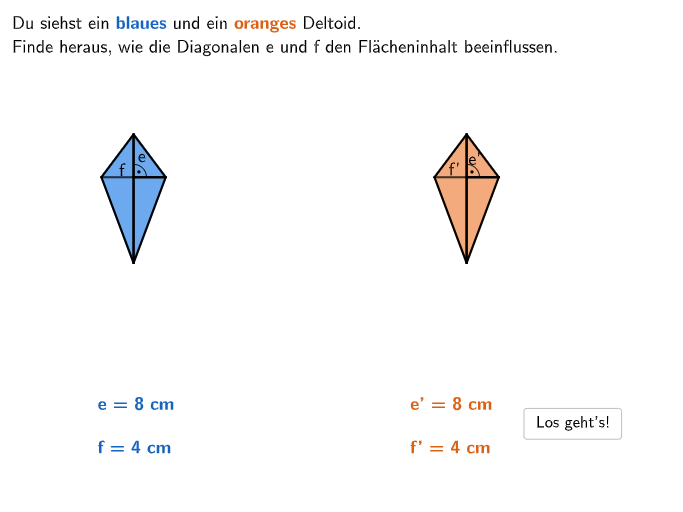
This GeoGebra lesson demonstrates, with an interactive animation and multiple-choice checks, how the area of a deltoid (kite-shaped quadrilateral) changes when one diagonal length is scaled (e.g., halved, doubled, multiplied by 3 or 4) while the other diagonal is kept fixed—or when both are scaled together. The central math concepts are the deltoid area relation A = (e·f)/2 and proportional reasoning: scaling diagonal e by k while keeping f constant scales area by k; scaling both e and f by k scales area by k^2. Construction-wise, the diagram uses geometric primitives such as Spline and Segment to form the kite shape, Midpoint to locate key points, and Sequence together with SelectedIndex and If to manage the step-by-step scenarios and answer-state changes. Text labels update the variables and results, while helper objects like ehalf, fdouble, fhalf, edouble and factors/stored values (faktore, faktorf) encode the diagonal transformations (e/f scaling). Controls (start/continue/again/back, step counters, and reset buttons) support guided animation for classroom use. Suitable for grades 5–6, especially for applying area formulas of special quadrilaterals and practicing reasoning with scaling laws.
GeoGebra Commands & Parameters
Spline({M, N, K}, 3) → aSpline({M, L, J}, 3) → bSpline({G, P, R}, 3) → cSpline({G, O, Q}, 3) → dSequence(Segment[K + (Vector[J, A] * i / 2), J + (Vector[J, A] * i / 2)], i, 0, 2) → OrangeKanten1Sequence(Segment[K + (Vector[K, J] * i / 8), B + (Vector[K, J] * i / 8)], i, 0, 8) → OrangeKanten2Sequence(Segment[Q + (Vector[Q, E] * i / fquadrate), R + (Vector[Q, E] * i / fquadrate)], i, 0, fquadrate) → BlueKanten2Sequence(Segment[R + (Vector[R, Q] * i / ((2 * equadrate))), F + (Vector[R, Q] * i / ((2 * equadrate)))], i, 0, (2 * equadrate)) → BlueKanten1Segment(C, M) → fSegment(H, G) → gMidpoint(Anim2Tri1Anchor, Anim1Tri1E1) → UMidpoint(Anim2Tri2Anchor, Anim1Tri2E1) → VText(Text16, T + (0.1, 0.25), false, true, 0, 0) → Text19Text(Text14, U + (0.2, 0), false, true, 0, 0) → Text18Text(Text17, S + (0.1, 0.25), false, true, 0, 0) → Text20Text(Text15, V + (0.2, 0), false, true, 0, 0) → Text21SelectedIndex(DD1) → index1If(index1 ≟ 2, 0.25, index1 ≟ 3, 0.5, index1 ≟ 4, 1, index1 ≟ 5, 2, index1 ≟ 6, 4) → comparisonIf(factorproduct ≟ 0.25, 2, factorproduct ≟ 0.5, 3, factorproduct ≟ 1, 4, factorproduct ≟ 2, 5, factorproduct ≟ 4, 6) → correctindexSelectedIndex(DD2) → index2Angle(I, G, E) → αAngle(D, M, A) → β
AI Drawing Prompt Reference
Draw a kite-shaped quadrilateral using four curve segments connecting four points. Then draw two diagonals, keeping one fixed and adjusting the length of the other. Observe how the area of the kite changes as you scale the longer diagonal. Add text labels to display the lengths of the diagonals and the area of the kite.
The prompt above was compiled from the original drawing commands and is for reference only.