
Decimals on a Shaded Square: Geometry and Sequences
Loading the math board and drawing, please wait…
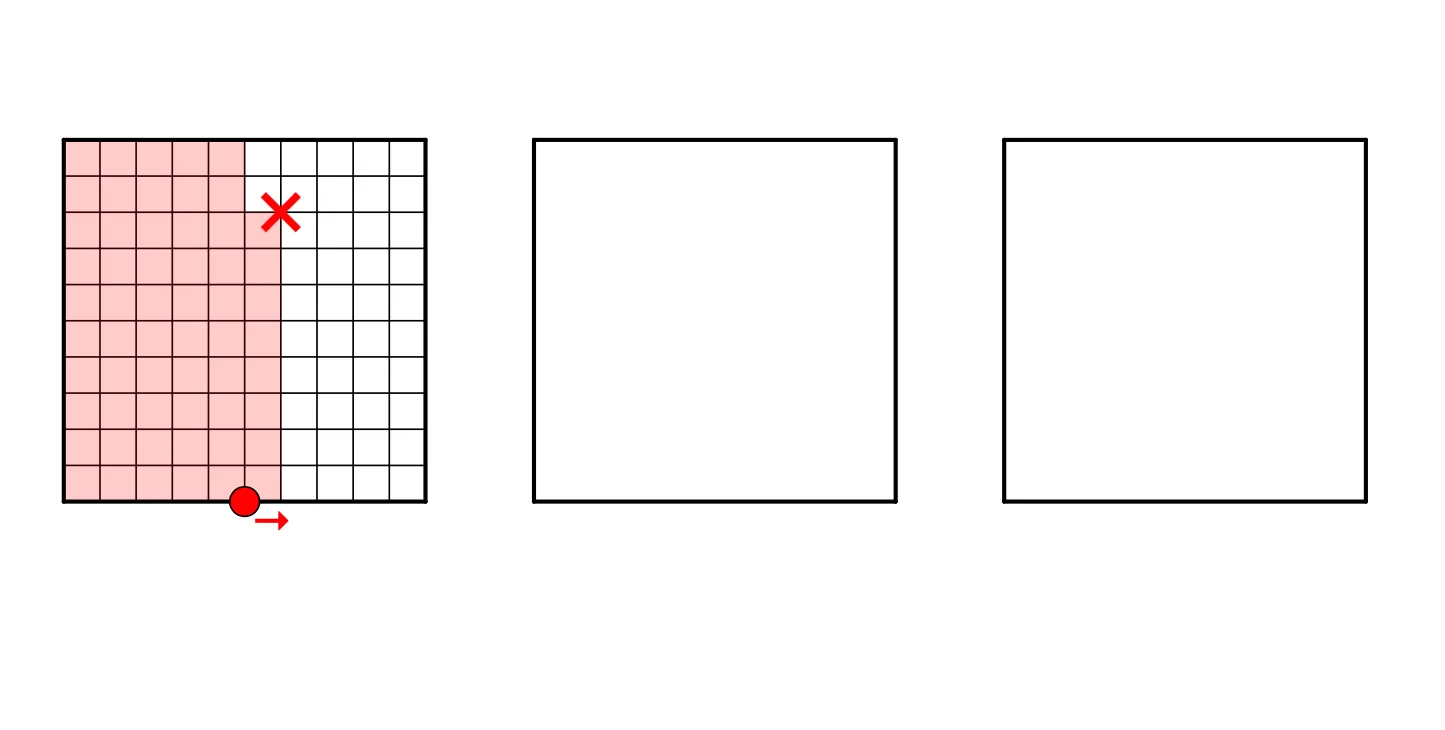
This example demonstrates how decimals are presented on a shaded square, combining geometry and sequences. Key mathematical concepts include coordinate geometry, sequences, and geometric construction. The construction involves GeoGebra commands such as Corner, Point, Polygon, etc. It is suitable for middle or high school mathematics education to understand the application of decimals in geometric figures.
GeoGebra Commands & Parameters
Corner(5) → A_1Point(Sequence[(k, 0), k, 0, 3.6, 0.1]) → APoint(Sequence[(x(A) + 0.1, j), j, 0, 1, 0.1]) → BPolygon((1.3, 0), (2.3, 0), (2.3, 1), (1.3, 1)) → poly3, i, j, k, lPolygon((2.6, 0), (3.6, 0), (3.6, 1), (2.6, 1)) → poly4, m, n, p, qIf(x(A) ≥ 1 ∧ x(A) < x(Vertex[poly3, 1]) ∨ x(A) ≥ x(Vertex[poly3, 2]) ∧ x(A) < x(Vertex[poly4, 1]) ∨ x(A) ≟ x(Vertex[poly4, 2]), true, false) → integerPolygon(A, A + (0.1, 0), A + (0.1, If[integer, 0, y(B)]), A + (0, If[integer, 0, y(B)])) → poly8, j_1, k_1, l_1, m_1Polygon((0, 0), (Min[x(A), 1], 0), (Min[x(A), 1], 1), (0, 1)) → poly5, r, s, t, a_1Polygon((x(Vertex[poly3, 1]), 0), (Max[Min[x(A), x(Vertex[poly3, 1]) + 1], x(Vertex[poly3, 1])], 0), (Max[Min[x(A), x(Vertex[poly3, 1]) + 1], x(Vertex[poly3, 1])], 1), (x(Vertex[poly3, 1]), 1)) → poly6, b_1, c_1, d_1, e_1Polygon((x(Vertex[poly4, 1]), 0), (Max[Min[x(A), x(Vertex[poly4, 1]) + 1], x(Vertex[poly4, 1])], 0), (Max[Min[x(A), x(Vertex[poly4, 1]) + 1], x(Vertex[poly4, 1])], 1), (x(Vertex[poly4, 1]), 1)) → poly7, f_1, g_1, h_1, i_1Polygon((0.8187524918794742, 1.1041021645196354), (1.818752491879475, 1.1041021645196354), (1.818752491879475, 2.1041021645196336), (0.8187524918794742, 2.1041021645196336)) → poly1, a, b, c, dPolygon((0, 0), (1, 0), (1, 1), (0, 1)) → poly2, e, f, g, hSequence(Segment[(0, j), (1, j)], j, 0, 1, 0.1) → list4Sequence(Segment[(x(Vertex[poly3, 1]), j), (x(Vertex[poly3, 1]) + 1, j)], j, 0, 1, 0.1) → list5Sequence(Segment[(x(Vertex[poly4, 1]), j), (x(Vertex[poly4, 1]) + 1, j)], j, 0, 1, 0.1) → list6Sequence(Segment[(i, 0), (i, 1)], i, 0, 1, 0.1) → list1Sequence(Segment[(x(Vertex[poly3, 1]) + i, 0), (x(Vertex[poly3, 1]) + i, 1)], i, 0, 1, 0.1) → list2Sequence(Segment[(x(Vertex[poly4, 1]) + i, 0), (x(Vertex[poly4, 1]) + i, 1)], i, 0, 1, 0.1) → list3If(y(B) < 1, (100 * poly8), 0) → hundredthdigit
AI Drawing Prompt Reference
Draw a coordinate-axes layout with a unit square from (0,0) to (1,1). Add two adjacent shaded vertical rectangular strips of height from y=0 to y=1: one spanning x=1.3 to x=2.3, and another spanning x=2.6 to x=3.6. Create a sequence of points along the x-axis from (0,0) to (3.6,0) in steps of 0.1, and use these x-positions to guide multiple vertical line segments aligned with y from 0 to 1. On the strip boundaries, subdivide the y-range into 0.1 intervals and construct the resulting polygonal regions so the shaded pieces visually encode decimals across the square and the two strips.
The prompt above was compiled from the original drawing commands and is for reference only.