
Custom Ruler Construction
Loading the math board and drawing, please wait…
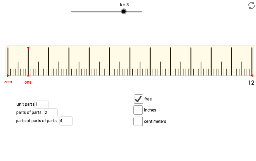
This example demonstrates how to construct custom geometric designs using GeoGebra, inspired by daily minimal sketches. It involves core math concepts like fractions, vectors, linear functions, hyperbolas, and angles. Key GeoGebra commands and objects used include Point, Vector, Sequence, Textfield, and Polygon. Suitable for high school and above learners to explore geometric constructions and function graph interactions.
GeoGebra Commands & Parameters
Point(Ray[A, A + (1, 0)]) → BPoint(Ray[B, B + (0, 1)]) → CVector(A, B) → uSequence(Translate[Segment[A, A + (0, s_0)], Vector[(i * u)]], i, 0, N) → list0Textfield(n_1) → InputBox1Textfield(n_2) → InputBox2Textfield(n_3) → InputBox3Textfield(n_4) → InputBox4Sequence(Translate[Segment[A, A + (0, s_1)], Vector[(i * u / n_1)]], i, 0, (N * n_1)) → list1Sequence(Translate[Segment[A, A + (0, s_2)], Vector[(i * u / ((n_1 * n_2)))]], i, 0, ((N * n_1) * n_2)) → list2Sequence(Translate[Segment[A, A + (0, s_3)], Vector[(i * u / (((n_1 * n_2) * n_3)))]], i, 0, (((N * n_1) * n_2) * n_3)) → list3Sequence(Translate[Segment[A, A + (0, s_4)], Vector[(i * u / ((((n_1 * n_2) * n_3) * n_4)))]], i, 0, ((((N * n_1) * n_2) * n_3) * n_4)) → list4Polygon(A - (a * (1, 0)), D + (a * (1, 0)), D + a + (0, s_0), A + (a * (-1, 1)) + (0, s_0)) → poly1, b, c, d, e
AI Drawing Prompt Reference
Draw a custom ruler starting from a point, extending horizontally and then vertically, with vectors indicating direction. Use sequences and fractional ratios to generate multiple points and connect them to form a polygon, showcasing geometric construction and function interaction involving points, vectors, linear functions, fractions, and angles.
The prompt above was compiled from the original drawing commands and is for reference only.